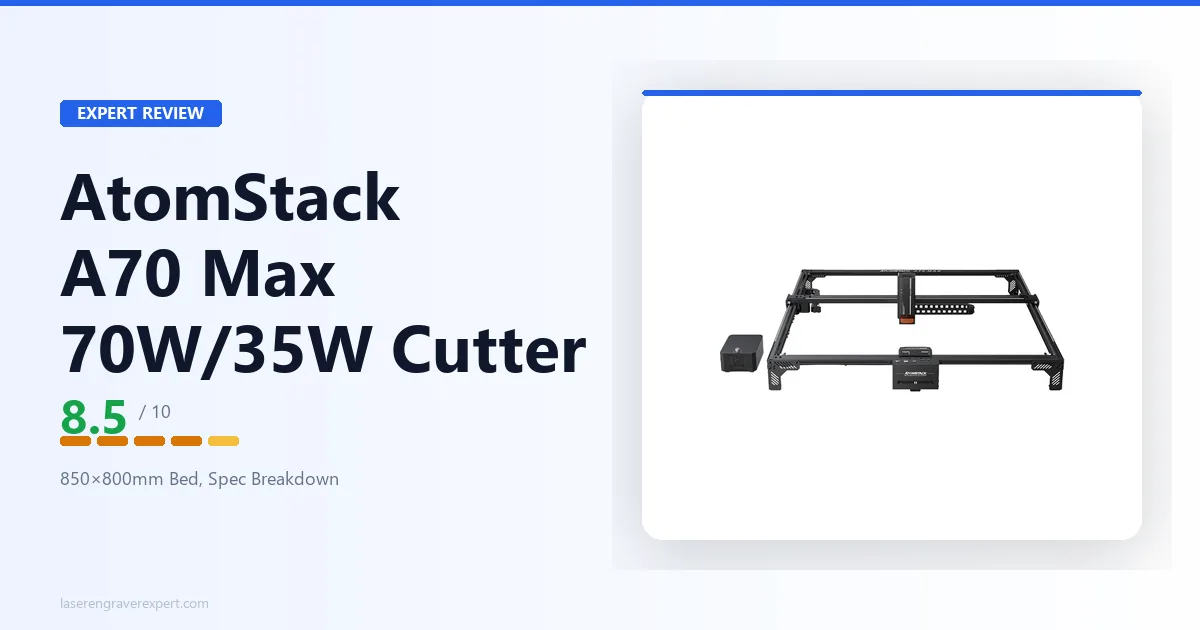
This AtomStack A70 Max review looks at where the largest-bed machine in AtomStack’s range fits: a one-click switchable 70W/35W diode laser paired with an 850 × 800mm work area and speeds up to 400mm/s. It’s a large-format, production-minded machine rather than a starter engraver, and this review covers what that switchable power and oversized bed actually get you, how it compares to the AtomStack A24 Pro , and who should buy it versus step across to a CO2 cutter.
This article contains affiliate links. If you purchase through our links, we may earn a commission at no extra cost to you.
Check Current Price on Amazon →
AtomStack A70 Max Specs at a Glance
| Specification | Value |
|---|---|
| Laser Type | Switchable diode (one-click 70W / 35W) |
| Optical Output Power | 70W / 35W switchable |
| Work Area | 850 × 800mm |
| Max Engraving Speed | Up to 400mm/s |
| Air Assist | Built-in |
| Autofocus | One-key auto focus |
| Controller | Onboard screen controller |
| Enclosure | No (open frame) |
| Availability | In stock |
| Configurations | Machine Only, Basic, Pro, Enclosure, Purifier, All-in-1 bundles |
| Warranty | 12-month |
Check Current Price on Amazon →
A note on what’s in that table: AtomStack does not publish a full structured spec sheet for the A70 Max in the same depth as some of its other machines. The figures above, switchable 70W/35W power, 850 × 800mm bed, up to 400mm/s, built-in air assist, screen controller, and one-key auto focus, are the confirmed headline specs. Where a number isn’t published (wavelength, spot size, exact frame weight, certifications), this review doesn’t guess at it. If a specific detail is decision-critical for you, confirm it against the current product listing before buying.
What the AtomStack A70 Max Is For
The A70 Max is the biggest-bed machine AtomStack makes, and that framing matters more than any single spec. Most of the AtomStack range, including the A24 Pro , lives in the 300–400mm work-area class aimed at hobbyists and smaller blanks. The A70 Max jumps to 850 × 800mm: roughly five to six times the bed area.
That bed changes what the machine is for. At this size you can:
- Lay out and cut full craft-plywood sheets without re-registering the material.
- Engrave large signage, address boards, and panoramic designs in one pass.
- Tile dozens of small items (coasters, ornaments, tags) across the bed and run them as a single batch job.
Pair that with the switchable 70W/35W laser and the positioning is clear: this is a large-format, throughput-oriented machine for workshop and small-production use, not a desk engraver.
The switchable power is the second half of the story. The 70W mode is for aggressive cutting: thicker wood, denser stock, fewer passes. The 35W mode drops to a finer, lower-heat beam better suited to detailed engraving where too much power scorches or over-burns fine linework. You move between the two from the controller, so a single machine covers both heavy cutting and detailed engraving without a hardware swap.
AtomStack A70 Max in the AtomStack Lineup
Where the A70 Max sits relative to its siblings is the most useful way to understand it.
| AtomStack A24 Pro | AtomStack A70 Max | |
|---|---|---|
| Laser power | 20–24W optical | Switchable 70W / 35W |
| Work area | 365 × 305mm | 850 × 800mm |
| Max speed | 600mm/s | Up to 400mm/s |
| Air assist | Included | Built-in |
| Autofocus | No | One-key auto focus |
| Controller | USB to computer | Onboard screen controller |
| Enclosure | Open frame | Open frame |
| Best for | Hobbyist cutting/engraving | Large-format & production |
The A24 Pro is the machine most AtomStack buyers start with: a capable 24W open-frame engraver with a hobbyist-sized bed. The A70 Max is a different tier entirely. It’s not a replacement for the A24 Pro so much as a scale-up for people who’ve outgrown that class of bed and want substantially more cutting power.
Two honest tradeoffs stand out in that comparison. First, the A24 Pro is rated to a higher top engraving speed (600mm/s vs up to 400mm/s). On pure raster-engraving throughput for a fixed design, the smaller machine can actually move faster; the A70 Max’s advantage is area and cutting power, not line speed. Second, the A70 Max adds conveniences the A24 Pro lacks, an onboard screen controller and one-key auto focus, that make large-bed, standalone operation less fiddly.
AtomStack’s own large-format direction also includes the Hurricane 55W CO2 as a sibling in the broader cutting range. It’s a different laser type (CO2 rather than diode) and a different tool for different materials, worth knowing exists if clear acrylic or glass work is on your list, though it’s a separate machine with its own tradeoffs rather than a direct A70 Max alternative.
AtomStack A70 Max Materials and Cutting Capability
As a diode laser, the A70 Max follows the same material rules as the rest of the diode category, just with more power behind them.
Where the 70W mode earns its place is cutting. More optical power means thicker stock in fewer passes and faster cutting on the same material, which is exactly what a large-format production machine needs. Wood, plywood, MDF, leather, dark acrylics, and similar diode-friendly materials all benefit from the extra headroom, and the big bed means you can cut large pieces without splitting a job across multiple setups.
Where the 35W mode comes in is fine engraving. Dropping to the lower-power setting gives a cooler, more controllable beam for detailed work, photo engraving, fine linework, delicate contrast, where full power would over-burn. Being able to switch without swapping hardware is the practical win here.
The hard limit is the same as every diode laser: clear acrylic. Blue-diode light passes through clear material rather than being absorbed, so it doesn’t cut cleanly no matter the wattage. If clear acrylic, glass cutting, or similar is central to your work, a CO2 machine is the right tool, and our best CO2 laser engraver guide covers the step-up options for buyers who need that capability. The AtomStack Hurricane 55W CO2 mentioned above is one such path within the same brand.
AtomStack A70 Max Workflow: Controller, Air Assist, and Autofocus
For a machine this size, standalone usability matters, and the A70 Max leans into it.
The onboard screen controller means you can frame, start, and manage jobs from the machine itself rather than being tethered to a computer for every action. On a large bed where you’re loading big or heavy stock, that’s a genuine convenience.
One-key auto focus removes one of the most repetitive friction points on open-frame machines. On a machine without it, you re-set focus by hand at every material-thickness change; batching mixed-thickness jobs across a big bed gets tedious fast. One-key focus addresses that directly.
Built-in air assist is the right inclusion for a cutting-focused machine. Air assist clears smoke and debris from the cut line, which improves edge quality and reduces charring, and matters more the more cutting you do. Having it built in rather than as an add-on is appropriate at this tier.
What the published information doesn’t fully detail is connectivity and the exact software path. AtomStack’s open-frame machines are generally LightBurn-compatible, and most buyers at this level will want to run LightBurn, but the specific controller and compatibility details for the A70 Max aren’t spelled out in full. If LightBurn support is a hard requirement, confirm it for this exact model before purchase rather than assuming it carries over from other machines in the range.
AtomStack A70 Max Pros and Cons
Pros:
- Largest work area in the AtomStack lineup at 850 × 800mm, built for full-sheet and large-format work.
- One-click switchable 70W/35W laser covers aggressive cutting and fine engraving from a single machine.
- Built-in air assist, onboard screen controller, and one-key auto focus suit standalone, production-style operation.
- Multiple bundle configurations (including enclosure and air purifier options) let you build toward a more contained setup.
Cons:
- Open frame: no containment of fumes or beam, so a ventilated, safely enclosed-off workspace is required.
- Large footprint and a serious investment, not a starter or casual-hobby machine.
- Rated top engraving speed (up to 400mm/s) is lower than some smaller AtomStack machines; its strength is area and power, not line speed.
- Several specs (wavelength, spot size, full software/controller details) aren’t published in depth, so confirm decision-critical details before buying.
The large bed, switchable power, and standalone workflow features are the real strengths; the open frame, footprint, and incomplete published spec detail are the trade-offs to weigh.

AtomStack A70 Max
8.5/10- 850×800mm work area: the largest in the AtomStack lineup
- One-click switchable 70W/35W laser for both cutting and engraving
- Built-in air assist for cleaner cut edges
- Onboard screen controller and one-key auto focus for standalone operation
- Enclosure and purifier bundle options available
- Open frame: no fume or beam containment out of the box
- Large footprint and significant investment
- Rated top speed (up to 400mm/s) trails some smaller siblings
- Clear acrylic won't cut (diode-laser limitation)
AtomStack A70 Max vs AtomStack A24 Pro
The most natural in-brand comparison is against the AtomStack A24 Pro , the machine many buyers would be stepping up from.
These are machines for different jobs. The A24 Pro is a hobbyist open-frame engraver: a 24W module, a 365 × 305mm bed, and a price that fits a first or second laser. It’s ideal for coasters, plaques, signs, and cutting up to mid-thickness plywood in a home workshop.
The A70 Max is a scale-up on both power and area. The switchable 70W mode cuts more aggressively and the 850 × 800mm bed handles work the A24 Pro simply can’t fit. If your bottleneck is that jobs don’t fit on the bed, or that cutting thicker stock takes too many passes, that’s exactly what the A70 Max solves.
The one place the A24 Pro holds an edge is rated top engraving speed (600mm/s vs up to 400mm/s). For someone whose work is small-format, speed-sensitive raster engraving, the smaller, faster machine may genuinely suit better. For large-format cutting and production batching, the A70 Max is the clear choice.
Decision framework: need a bigger bed and more cutting power for production or large pieces, pick the A70 Max. Working on hobbyist-sized blanks and want maximum value, the A24 Pro remains the smarter buy.
AtomStack A70 Max vs Hurricane 55W CO2
Worth naming briefly, because buyers shopping for a large cutter often weigh diode against CO2: AtomStack also offers the Hurricane 55W CO2 in its cutting range.
The core difference is laser type. The A70 Max is a diode laser, excellent on wood, dark acrylics, leather, and similar materials, but unable to cut clear acrylic or glass. A CO2 machine like the Hurricane works at a wavelength that does cut clear acrylic cleanly and handles a broader cutting-material range.
They’re complementary tools rather than direct rivals. If your work is wood-and-dark-acrylic-heavy and you want the largest diode bed AtomStack offers, the A70 Max fits. If clear acrylic or glass is central to your business, a CO2 machine is the right direction, see our best CO2 laser engraver guide for the full breakdown of what to look for there. The Hurricane’s own detailed review isn’t published yet; this is a name-check so you know the CO2 sibling exists in the same brand.
Who Should Buy the AtomStack A70 Max?
The maker who has outgrown a hobbyist bed. If you’re constantly splitting jobs because they don’t fit a 400mm-class machine, the 850 × 800mm bed is the fix. Large signage, full-sheet cutting, and panoramic engraving all become single-setup jobs.
The small-production or small-business workshop. Batch-cutting wood blanks, running many items per setup, and switching between heavy cutting and fine engraving from one controller is exactly the workflow this machine is built for. If you’re building a laser-based business, our best laser engraver for small business guide covers where a large diode machine like this fits alongside enclosed and CO2 options.
The buyer who wants cutting power and standalone operation. The 70W mode, built-in air assist, screen controller, and one-key auto focus together make this a machine you can run as a dedicated cutting station rather than a computer-tethered engraver.
Who Should Skip the AtomStack A70 Max?
Anyone without a ventilated, safe workspace. This is an open-frame machine with a very large bed. Fumes, particles, and the beam path are uncontained, and the footprint demands a dedicated space. If you can’t ventilate properly or can’t dedicate the bench space, this isn’t the machine, consider an enclosed option instead.
First-time buyers and casual hobbyists. The A70 Max is a large-format, significant-investment machine. If you’re buying your first laser or working on small projects, the AtomStack A24 Pro or a smaller enclosed machine is a far better starting point.
Buyers who need clear acrylic or glass. As a diode laser, the A70 Max can’t cut clear acrylic. If that’s central to your work, go CO2.
Buyers who need every spec confirmed up front. AtomStack doesn’t publish a fully detailed spec sheet for this model. If you require published wavelength, spot size, and certified software compatibility before committing, confirm those directly with AtomStack for this exact machine first.
AtomStack A70 Max Review: Final Verdict
The AtomStack A70 Max is a genuine large-format machine, and it earns its rating by doing one thing clearly: giving you the biggest diode bed AtomStack offers with switchable 70W/35W power behind it.
Here’s how to think about it. If your work has outgrown a hobbyist bed, if you’re splitting jobs because material doesn’t fit, or if you want to run heavy cutting and fine engraving from a single machine, the A70 Max is built for exactly that. The 850 × 800mm area and the one-click power switch are the features that justify the step up, backed by built-in air assist, a screen controller, and one-key auto focus for standalone operation.
Where it asks something of you: a ventilated, dedicated workspace for the open frame, a real footprint, and a serious investment. It’s not a first laser, and it’s not for clear-acrylic work. And because AtomStack doesn’t publish an exhaustive spec sheet for this model, buyers who need every number confirmed should check with the manufacturer on the specific details that matter to them.
Rating: 8.5/10. A strong large-format diode cutter for makers and small-production shops who need the bed size and the cutting power, with the open-frame caveats that come with the territory.
Ready to buy?
See the AtomStack A70 Max on Amazon →Still mapping out the right machine for a growing workflow? Our best laser engraver for small business roundup and best CO2 laser engraver guide cover the full field of large-format and production-capable options across both diode and CO2.