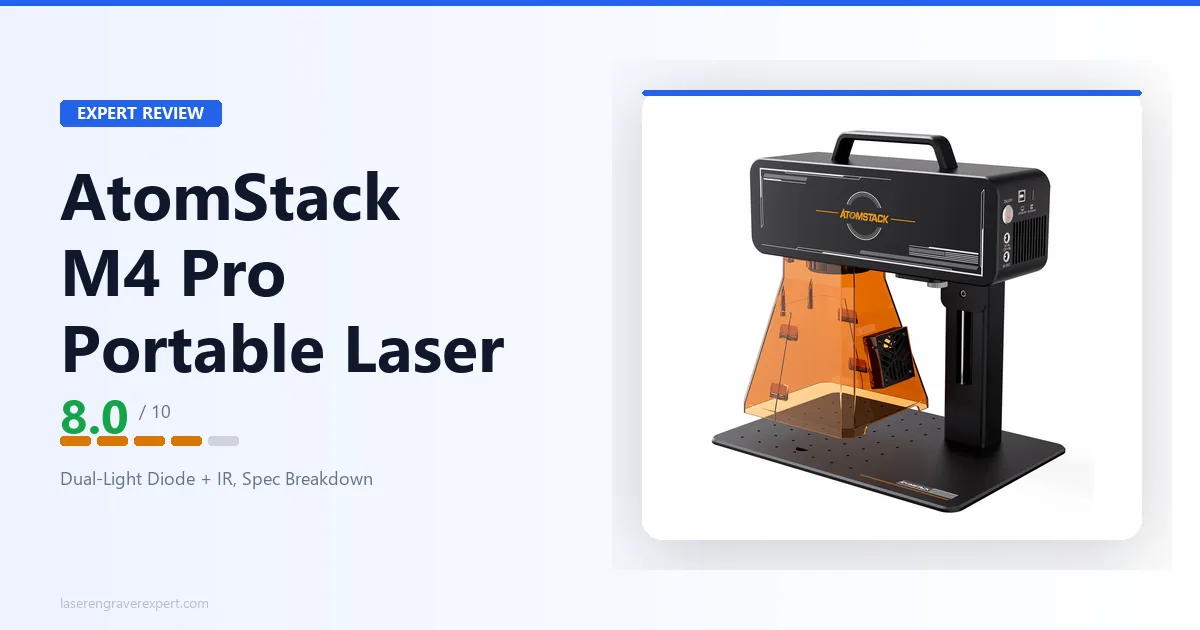
This AtomStack M4 Pro review looks at a machine built around one idea: putting two laser wavelengths in a single portable head so you can mark both metal and organic materials without owning two machines. AtomStack calls it a “dual-light” laser, and that term is literal, a 10W 450nm blue diode paired with a 2W 1064nm infrared laser. Add a genuine desktop-and-handheld 2-in-1 design and LightBurn support, and the M4 Pro is a flexible small-format marker aimed squarely at mixed-material work. The catch is a compact 100×100mm bed. This review covers what dual-light actually buys you, how the M4 Pro compares to the closely-matched LaserPecker LP4 , and who should buy it versus skip it.
This article contains affiliate links. If you purchase through our links, we may earn a commission at no extra cost to you.
AtomStack M4 Pro Specs at a Glance
| Specification | Value |
|---|---|
| Laser sources | 10W diode (450nm) + 2W IR (1064nm) |
| Work area | 100 × 100mm |
| Working speed | 4,000mm/s (diode); 5,000mm/s (IR) |
| Preview speed | 12,000mm/s |
| Positioning accuracy | 0.001mm |
| Spot size | As low as 0.03mm |
| Cutting depth | 8mm wood; 5mm black acrylic (diode) |
| Form factor | Desktop & Handheld 2-in-1 |
| Autofocus | Smart autofocus (material-thickness knob) |
| Software | AtomStack Maker + LightBurn |
| Operating systems | iOS, Android, macOS, Windows |
| Rotary / chuck | Supported (sold separately) |
| Input power | 12V 9A |
| Weight | 2.8kg (handheld); 4.8kg (desktop) |
| Certifications | CE, UKCA, FCC, ROHS, FDA |
| Warranty | 12-month |
| Availability | In stock |
A note on these figures: AtomStack publishes a reasonably complete spec list for the M4 Pro, and the table above reflects what AtomStack states for this model. Where a figure isn’t listed, this review flags it rather than guessing, the dual working speeds (one for each laser source), the 100×100mm bed, the two form-factor weights, and the cutting depths are all drawn directly from AtomStack’s published specifications.
What “Dual-Light” Actually Means on the M4 Pro
The name is the feature, so it’s worth being precise about what “dual-light” means here, because it’s easy to confuse with other dual-setups on the market.
Dual-light on the M4 Pro means two laser sources of two different wavelengths, built into a single head:
- A 10W 450nm blue diode laser, the same class of laser found in most desktop engravers. Blue-diode light is absorbed well by wood, leather, paper, dark acrylic, and coated or treated metal surfaces.
- A 2W 1064nm infrared (IR) laser. Infrared light at 1064nm behaves completely differently: it’s absorbed by bare metals and certain plastics that a blue diode passes right over.
That pairing is deliberate, and it solves a real, physics-level problem. No single laser wavelength is good at everything. A blue diode is excellent on organics but physically cannot mark most bare metals. An IR laser marks metal directly but is poor on many organics. By carrying both, the M4 Pro lets you move from engraving a wooden gift tag to marking a stainless steel tool without changing machines, you switch which source fires.
This is exactly the same wavelength pairing, 10W diode plus 2W IR, that the LaserPecker LP4 uses, which is why the LP4 is the M4 Pro’s single closest comparison. It is not the same as a diode-plus-fiber machine (like the xTool F1 Ultra’s 20W fiber), where the metal-marking source is a far more powerful fiber laser. A 2W IR source is a light-duty metal marker: genuinely useful for marking, not a substitute for a dedicated fiber laser doing deep, fast, production-grade metal work.
If you want the deeper background on why wavelength governs what a laser can do, our diode vs CO2 vs fiber laser guide covers it in full. The short version: the M4 Pro’s dual-light design is a way to get two of those wavelengths in one portable box.
The Desktop-and-Handheld 2-in-1 Design
The second headline feature is portability, and it’s more than a marketing word on this machine. AtomStack lists the M4 Pro in two configurations with two different weights: a 2.8kg handheld setup and a 4.8kg desktop setup.
The handheld mode is the genuinely distinctive part. Most desktop engravers assume your workpiece lies flat on a bed. A handheld laser flips that assumption: you bring the laser to the object. That matters for anything that can’t sit flat, curved surfaces, vertical faces, oddly shaped tools, parts of a larger assembly you can’t disassemble. For marking a logo on the side of a bottle, a serial number on an installed part, or a design on a surface that won’t fit under a gantry, a handheld source is a different capability entirely, not just a smaller version of a bench machine.
The desktop mode gives you the opposite: a stable, repeatable platform for batch work on small flat items. AtomStack pairs this with a One-Key Repeat Engraving feature aimed at exactly that use, running the same job across a batch of identical pieces.
Rounding out the workflow, AtomStack lists a smart autofocus that sets focus from a material-thickness knob rather than manual trial-and-error, and support for optional chuck and rotary accessories (sold separately) for cylindrical and spherical objects like rings, tumblers, and pens. Those accessories matter more than usual on a machine with such a small flat bed, they’re how you get around the 100×100mm limit for round objects.
AtomStack M4 Pro Materials: Diode Side and IR Side
Because the M4 Pro has two laser sources, its material list splits in two, and understanding which source does what is key to knowing whether the machine fits your work.
10W diode (450nm) materials, per AtomStack’s listing: lacquered metal, anodized aluminum, 304 stainless steel, bamboo, wood, leather, food, paper, fabric, photosensitive printing material, plastic, acrylic, tinted glass, and color-glaze ceramics. This is the classic diode material set, strong on organics and coated or treated surfaces. Note that the “metal” entries here (anodized aluminum, lacquered metal, 304 stainless) are surfaces where a coating or treatment lets the blue diode take hold, which is different from marking raw, untreated metal.
2W IR (1064nm) materials, per AtomStack’s listing: metal, plastic, leather, and any material with a paint coating. This is where direct bare-metal marking lives. The IR wavelength is absorbed by metal itself, so it can mark surfaces the diode can’t, the practical reason to pay for a dual-light machine instead of a diode-only one.
Cutting, as opposed to surface marking, is a diode-side capability here. AtomStack lists cutting depths of up to 8mm wood and 5mm black acrylic. That’s real cutting capability for a portable machine, enough to cut out small wooden shapes or acrylic pieces, though always within that small 100×100mm field.
The standard diode limits still apply. Clear acrylic and plain (uncoated) glass aren’t diode-cuttable, blue-diode light passes through clear materials rather than being absorbed. If clear acrylic or glass cutting is central to your work, that’s CO2 territory, and our best CO2 laser engraver guide covers the right tools for it. The M4 Pro is a marking-and-light-cutting machine for small mixed-material work, not a clear-material cutter.
Speed, Accuracy, and the 100×100mm Bed
AtomStack lists separate working speeds for each laser source: 4,000mm/s for the diode and 5,000mm/s for the IR laser, with a preview (framing) speed of 12,000mm/s. These are high numbers, consistent with a galvo-style scanning approach where the beam is steered by mirrors rather than dragged on rails, and it’s part of why a compact marker like this can finish small jobs quickly. Positioning accuracy is listed at 0.001mm and spot size as low as 0.03mm, both pointing at fine detail capability on small work.
But the number that defines this machine is the 100×100mm work area. That’s small, and it’s the single most important thing to internalize before buying. It’s sized for:
- Badges, name tags, and pet tags
- Jewelry and small metal blanks
- Hand tools, pens, and small parts
- Small gift items and personalized trinkets
It is emphatically not sized for cutting boards, signs, large panels, or anything wide and flat. A standard charcuterie board won’t fit; a large sign won’t fit. For round objects you can work around the flat-bed limit with the optional rotary or chuck, but for wide flat pieces there’s no workaround, they simply don’t fit.
This is the central tradeoff of the whole machine. You’re trading work area for two things most engravers don’t offer: dual-wavelength marking and a true handheld mode. If your projects are genuinely small and the dual-light and handheld features matter, that trade makes sense. If your projects are large, the compact bed will fight you on every job.
AtomStack M4 Pro Software and Connectivity
AtomStack lists the M4 Pro as compatible with both its own AtomStack Maker software (provided free) and LightBurn, with a companion mobile app as well. The listed operating systems are iOS, Android, macOS, and Windows, so both desktop and phone-driven workflows are covered.
LightBurn support is a meaningful point in the M4 Pro’s favor. A lot of compact and portable machines lock you into a proprietary app; LightBurn compatibility means experienced users can bring the design tools, layer control, and workflow habits they already rely on from other machines. For anyone already running a LightBurn setup, that lowers the learning curve considerably. AtomStack Maker and the mobile app, meanwhile, give newer users an easier on-ramp and the option to run jobs from a phone, which pairs naturally with the handheld, work-anywhere positioning.
AtomStack M4 Pro vs LaserPecker LP4
This is the comparison that matters most, because the M4 Pro and the LaserPecker LP4 are built on the same core idea: a 10W diode plus a 2W IR laser in a portable, LightBurn-compatible body for mixed metal-and-organic work. They’re genuinely close rivals, so the differences are what decide it.
| AtomStack M4 Pro | LaserPecker LP4 | |
|---|---|---|
| Laser sources | 10W diode (450nm) + 2W IR (1064nm) | 10W diode (450nm) + 2W IR (1064nm) |
| Work area | 100 × 100mm | 160 × 120mm (300mm with slide extension) |
| Handheld mode | Yes (desktop & handheld 2-in-1) | No (portable desktop unit) |
| Cutting depth | 8mm wood; 5mm black acrylic | 8mm basswood; 5mm black acrylic |
| LightBurn | Yes | Yes |
| Own software | AtomStack Maker + mobile app | LaserPecker Design Space + mobile app |
| Weight | 2.8kg handheld / 4.8kg desktop | 4.23kg total |
| Rotary | Optional (sold separately) | Optional (sold separately) |
The two machines are strikingly similar on the fundamentals, same wavelengths, same laser powers, comparable cutting depths, both LightBurn-compatible. So the decision comes down to two things.
The M4 Pro’s edge is the handheld mode. The LP4 is portable in the sense of being compact and light, but it’s still a bench unit, your workpiece goes under it. The M4 Pro’s true handheld configuration lets you mark objects that can’t lie flat at all. If you need to mark curved, vertical, or installed surfaces, that’s a capability the LP4 doesn’t match.
The LP4’s edge is work area. At 160×120mm (and up to 160×300mm with its slide extension), the LP4’s diode field is meaningfully larger than the M4 Pro’s 100×100mm. For flat work on slightly larger pieces, the LP4 gives you more room before you hit the wall.
Decision framework: if marking non-flat, curved, or awkward objects is part of your work, the M4 Pro’s handheld mode is the differentiator and likely the better buy. If your work is flat and you want the most work area in this dual-source class, the LP4 is the one to get. Both are excellent at the shared core job of mixed metal-and-organic marking on small items.
AtomStack M4 Pro in the Portable Laser Category
Stepping back from the direct LP4 matchup, it’s worth placing the M4 Pro in the wider portable field, because “portable” covers a surprisingly broad range of machines.
Our best portable laser engraver guide breaks the category into tiers, and the M4 Pro lands in the premium, capability-first part of it, the same tier as the LP4. These are the machines you buy when you need real capability (metal marking, mixed materials, meaningful speed) in a package you can move, rather than the cheapest or most pocketable option.
What sets the M4 Pro apart even within that premium tier is the handheld mode. Most portable engravers, including the LP4 and the smaller pocket machines, are still fixed-position units: compact, movable, but operated with the workpiece under the laser. The M4 Pro’s ability to be picked up and pointed at an object is a different kind of portability, less “a small machine I can carry to a job site” and more “a laser I can aim at whatever needs marking.” For field marking, on-site personalization, or working on objects too large or fixed to bring to a bench, that distinction is the entire value proposition.
The flip side, again, is the small flat bed. The M4 Pro is a specialist: a mixed-material, metal-capable, handheld-capable marker for small items. It is not a generalist engraver, and buyers who want one machine to do large flat work too should look at full-size desktop options instead.
AtomStack M4 Pro Pros and Cons
Pros:
- Genuine dual-light design: 10W 450nm diode plus 2W 1064nm IR laser covers both organic materials and direct bare-metal marking in one head.
- True desktop-and-handheld 2-in-1, the handheld mode marks curved, vertical, and non-flat objects a fixed-bed engraver can’t reach.
- LightBurn compatible alongside free AtomStack Maker software and a mobile app, across iOS, Android, macOS, and Windows.
- Real diode cutting capability listed (up to 8mm wood, 5mm black acrylic), not just surface marking.
- Smart autofocus and optional chuck/rotary support for cylindrical and spherical objects.
- Full certification set listed (CE, UKCA, FCC, ROHS, FDA) and a 12-month warranty.
Cons:
- 100×100mm work area is small, the defining limitation; unsuitable for large flat pieces, signs, or cutting boards.
- The 2W IR laser is a light-duty metal marker, not a substitute for a dedicated fiber laser on deep or high-volume metal work.
- As a diode laser, the diode side can’t cut clear acrylic or plain glass (inherent to the wavelength, not a defect).
- Rotary and chuck accessories, which matter most on such a small bed, are sold separately.
The dual-light flexibility and the handheld mode are the real strengths; the small bed and the light-duty nature of the 2W IR source are the trade-offs to weigh.

AtomStack M4 Pro
8.0/10- Dual-light design: 10W 450nm diode + 2W 1064nm IR laser marks both organics and bare metal
- True desktop-and-handheld 2-in-1 for marking curved and non-flat objects
- LightBurn compatible plus free AtomStack Maker software and mobile app
- Real cutting capability listed: up to 8mm wood and 5mm black acrylic
- Smart autofocus and optional chuck/rotary support for round objects
- Full certification set (CE, UKCA, FCC, ROHS, FDA) and 12-month warranty
- 100×100mm work area is small, unsuitable for large flat pieces
- 2W IR laser is light-duty, not a fiber-laser replacement for heavy metal work
- Diode side can't cut clear acrylic or glass (inherent diode limitation)
- Rotary and chuck accessories sold separately
Who Should Buy the AtomStack M4 Pro?
The maker doing small, mixed-material work. If your projects move between wood, leather, and acrylic on one hand and metal on the other, badges, tags, jewelry, small tools, personalized gifts, the dual-light design means one machine instead of two. That’s the core buyer.
Anyone who needs to mark non-flat objects. This is the M4 Pro’s standout case. If you mark curved surfaces, vertical faces, installed parts, or anything that won’t lie flat under a gantry, the handheld mode is a genuine, differentiated capability that most engravers, including the LP4, don’t offer.
The buyer who wants bare-metal marking without a fiber laser. The 2W IR source marks stainless steel, coated, and painted metals directly. For light-duty metal personalization, name tags, small plaques, tool marking, that’s often all you need, and it comes alongside full diode capability for organics.
The LightBurn user who wants portability. Because the M4 Pro supports LightBurn, experienced engravers can carry a familiar workflow into a portable, dual-source, metal-capable machine rather than learning a closed app.
Who Should Skip the AtomStack M4 Pro?
Anyone who works on large flat pieces. The 100×100mm bed is the hard limit. Cutting boards, signs, large panels, wide flat items, none of them fit, and there’s no workaround for flat work. If your pieces are big, this is the wrong machine; a full-size desktop engraver is the right direction.
Buyers who need heavy or high-volume metal work. The 2W IR laser is a capable light-duty marker, but it isn’t a fiber laser. For deep engraving, fast throughput, or production metal marking, a dedicated fiber machine is the correct tool.
Buyers who need clear acrylic or glass cutting. As a diode laser, the M4 Pro’s diode side can’t cut clear acrylic or plain glass. If that’s central to your work, go CO2, see our best CO2 laser engraver guide .
Buyers who want a single do-everything machine. The M4 Pro is a specialist: small, mixed-material, handheld-capable. It’s excellent at that; it’s not trying to be a generalist. If you want one machine for both small marking and large flat work, you’ll need a different (or additional) tool.
AtomStack M4 Pro Review: Final Verdict
Rating: 8.0/10. A flexible, dual-light portable marker that stands out for its handheld mode and mixed-material range, held back from a higher score only by the small work area that defines, and limits, what it’s for.
Ready to buy?
See the AtomStack M4 Pro on Amazon →Still weighing your options in this class? Our LaserPecker LP4 review covers the closest dual-source rival with a larger flat bed, and our best portable laser engraver guide maps the full portable category from pocket-sized to capability-first.