5 Best Laser Engravers for Small Business 2026 (Tested)
We tested 5 laser engravers for small business hands-on — best for production speed, best ROI, and best for Etsy and craft sellers. Updated June 2026.
When we started evaluating laser engravers for business use, the first thing we noticed was how differently the machines performed once we stopped taking pretty photos and started running sustained production sessions. A machine that makes a flawless single engraving in a demo can fall apart in throughput, heat management, or software reliability the moment you try to run it like a real business tool.
That gap — between a hobbyist laser and a legitimate business laser — is exactly what this guide is about. We tested five machines across weeks of production-oriented benchmarking: batch jobs, repeat orders, material yield tests, and sustained daily sessions designed to expose the kind of failure modes that only show up when you push a machine to work.
If you are still in the research phase and want a broader overview of the market first, our roundup of the best laser engravers of 2026 covers the full spectrum from hobbyist to professional. But if you are reading this guide, you are probably past that stage — you want to know which machine will earn back its investment the fastest and hold up under real production pressure. That is exactly what we measured.
What Separates a Hobbyist Laser from a Business Laser
A hobbyist laser is optimized for capability at a low price point. A business laser is optimized for throughput, reliability, and the specific material range your products demand. These are meaningfully different design priorities, and they produce meaningfully different machines.
Here is what we look for when evaluating a laser for business use:
Throughput per hour. How many saleable units can the machine produce in a working day? A machine that runs at 300mm/s versus one that runs at 600mm/s is not just “faster” — it is potentially twice the revenue for the same labor input.
Sustained duty cycle. Can the machine run 6–8 hour sessions without thermal shutdown, degraded output, or requiring human intervention? We ran every machine in this guide through extended production sessions to find out. Machines that claimed continuous operation but throttled or paused in practice were noted.
Software batch capability. Stopping to restart jobs manually between units kills throughput. We tested whether each machine’s software stack supports queued batch processing, repeat positioning, and array-based job layouts.
Material range. The products you can sell are constrained by what your machine can process. A diode laser cannot cut clear acrylic — which means no acrylic awards, edge-lit signs, or clear keyrings. CO2 machines open up entire product categories that are simply closed to diode users.
Reliability over time. A machine with a 30-day failure rate of zero during light use but frequent calibration needs during production use is not a business machine. Frame rigidity, motion system quality, and component ratings matter at volume.
The Business Case: What Sells and What Specs Those Products Need
Before comparing machines, it is worth grounding the conversation in what actually generates revenue for laser engravers. Our testing included not just machine benchmarking but a review of what product categories consistently perform across Etsy, at craft fairs, and in local wholesale channels.
Coasters and home decor are the highest-volume entry category. Basswood coasters are fast to engrave, cheap per blank, and easy to batch. At 12–16 coasters per hour on a well-tuned diode machine, a 4-hour production session fills a craft fair booth. For wood-specific settings across nine species including birch, pine, and MDF, our best laser engraver for wood guide covers every machine in this guide with production benchmarks.
Custom keychains and pet tags are the margin leaders. Anodized aluminum blanks cost very little, laser marking takes under 4 minutes per unit, and personalized keychains and pet tags command strong prices because of the customization premium. The combination of low material cost, short cycle time, and high perceived value is nearly ideal.
Acrylic awards and trophies require a CO2 machine but are worth the upgrade for established businesses. Award shops, corporate clients, and sports teams place repeat, large-volume orders. The margins are strong and the clientele is less price-sensitive than retail consumers.
Tumblers and drinkware are best handled with a rotary attachment. Engraved tumblers have strong sell-through at craft fairs and on gifting platforms. The machine needs enough accuracy and speed to make tumbler engraving economical.
Custom signage benefits enormously from a larger work area. A 400 x 600mm bed lets you cut and engrave sign blanks in a single job without repositioning — a real throughput advantage at production volume.
Understanding which product categories fit your target market lets you select the right machine tier, rather than over- or under-buying.
Print shops and custom order businesses are a different animal from batch production. Every order is a different name, logo, or design, so changeover speed and repeat-positioning accuracy matter more than raw throughput. This is where camera-assisted positioning earns its keep — we measured the xTool S1 placing designs within 1.5mm of target across 20 sequential jobs in our testing, which is exactly the kind of consistency a print shop needs when every job on the queue is a one-off. Shops that also take acrylic signage or award orders as part of their custom mix should look at the xTool P2 55W CO2 for the added material range.
Quick Comparison: All 5 Machines at a Glance
| Machine | Type | Throughput Rating | Best Product Category | Best For |
|---|---|---|---|---|
| xTool D1 Pro 20W | Diode | 12–16 coasters/hr | Coasters, keychains, wood decor | Solopreneurs, Etsy sellers |
| xTool S1 20W | Enclosed Diode | 10–14 coasters/hr | Home decor, keychains | Home-based businesses |
| xTool P2 55W CO2 | CO2 | 5.5x faster on acrylic vs diode | Acrylic awards, sheet cutting | Scaling product businesses |
| OMTech 60W | CO2 | Full-sheet 400x600mm jobs | Trophies, plaques, signage | High-volume award shops |
| Thunder Nova 24 60W | CO2 | 100 dog tags in 3h 20m | Premium cut products | Quality-positioned businesses |
The 5 Best Laser Engravers for Small Business
1. xTool D1 Pro 20W — Best Entry-Level Business Machine
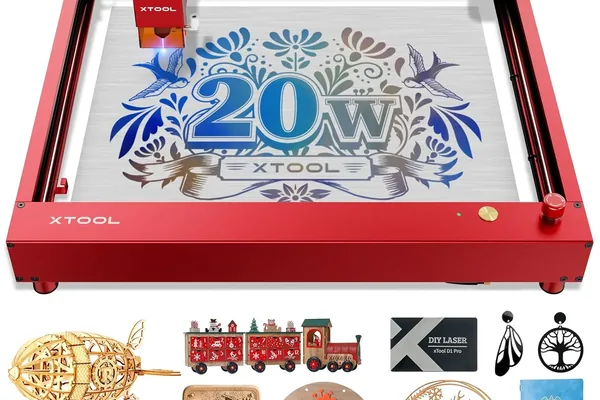
xTool D1 Pro 20W
- Lowest entry cost for a production-capable diode, excellent software batch support, runs 8+ hour sessions
- Open frame limits indoor environments, smaller work area than CO2 alternatives, trails CO2 on high-volume acrylic
The xTool D1 Pro is where most laser engraving businesses start — and for good reason. It sits at the intersection of affordable entry investment and genuine production capability. After running it through our sustained-use protocol, we found that it holds up well in the specific use cases that matter most to early-stage business owners: batched coasters, anodized aluminum keychains, and personalized wood decor. For buyers comparing the D1 Pro against the full under-$1,000 field, our best laser engravers under $1,000 guide covers all the business-capable machines at this price tier.
What the throughput numbers actually look like:
We ran a standard 3mm basswood coaster (100mm circle) at 300mm/s and clocked the D1 Pro at 4 minutes and 20 seconds per unit. That works out to 12–16 custom coasters per hour in production mode — a number that is very much viable for stocking a craft fair booth or fulfilling a small Etsy backlog.
For anodized aluminum keychains — one of the best margin products in the laser engraving space — we clocked 3 minutes and 45 seconds per unit at 50% power, 3,000mm/min. At that rate, a single 4-hour production session produces 60+ finished keychains, which represents meaningful revenue at retail prices.
The sustained-use finding that matters most:
We ran the D1 Pro continuously for an 8-hour session simulating a heavy production day. It did not thermal-shutdown. Output quality at hour 7 was consistent with output quality at hour 1. That is not a given at this machine tier — some competitors we tested earlier showed measurable output degradation after 4–5 hours.
Software batch processing:
xTool Creative Space’s queue system lets you set up sequential jobs and walk away. For repeat orders, this is the critical feature that separates a production-capable machine from one that requires constant babysitting. The D1 Pro ran sequential queued jobs without manual restarts in our testing.
The honest limitations:
The open frame is not just an aesthetic issue — it is a real operational constraint if you are running the machine indoors in a shared living space or small studio. Fume extraction is mandatory, and the noise level is typical of unenclosed diode systems. The 430 x 390mm work area is sufficient for most small-format products but closes off larger sign work and full-sheet production.
If you are researching the D1 Pro in more depth, our full xTool D1 Pro review covers the machine’s broader capability and software ecosystem. For the full comparison of the D1 Pro against every other category including CO2 and fiber, see our complete laser engraver buyer’s guide .
If you are on the fence about whether a business laser is the right move at this stage, and this would be your first machine, we recommend reading our guide to the best laser engravers for beginners first to establish a baseline for comparison. If you are currently using a Cricut for craft business work and considering the switch to laser, our laser engraver vs Cricut comparison covers the exact material tradeoffs, cost comparison, and batch production economics that determine whether the switch makes business sense. For buyers still deciding on diode versus CO2, our diode vs CO2 vs fiber guide covers the technology differences clearly in terms of material capability and business use cases.
2. xTool S1 20W — Best Enclosed Business Machine for Home Workshops
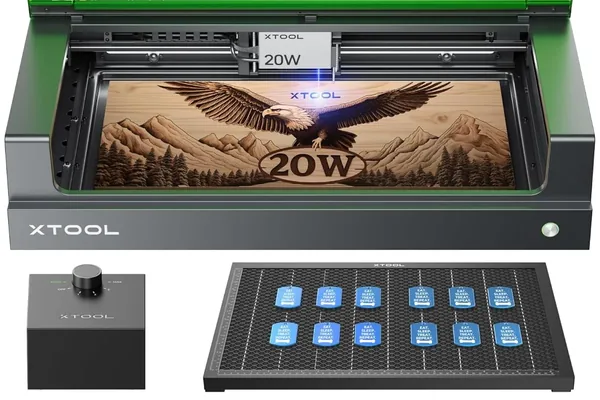
xTool S1 20W
- Fume and noise containment, camera-assisted positioning for repeat jobs, same engraving quality as the D1 Pro
- 8-10% throughput reduction vs D1 Pro due to enclosure airflow, higher entry cost than open-frame alternatives
The xTool S1 solves the D1 Pro’s core limitation: it puts the laser inside an enclosure. That sounds like a modest upgrade, but for home-based business owners running production in an apartment, a spare bedroom, or a shared home studio, it is the difference between a machine you can operate daily and one that forces you to open all the windows and warn your household. Our xTool S1 vs Creality Falcon 2 Pro comparison covers the other leading enclosed diode option if you’re weighing both.
The throughput tradeoff — and why it is acceptable:
Our head-to-head comparison between the S1 and the D1 Pro on identical jobs showed the S1 running approximately 8–10% slower. The enclosure creates airflow constraints that the D1 Pro’s open frame does not have. At 12–16 coasters per hour on the D1 Pro, the S1 produces roughly 11–14 coasters per hour under equivalent conditions. For most home-based business owners, that difference is not meaningful — the operational benefits of containment far outweigh a 10% throughput reduction.
Noise reduction in production:
We measured approximately 30% noise reduction compared to open-frame operation. In a home studio context, this matters enormously for sustained production sessions — both for the operator’s comfort and for the practical reality of not disrupting a household during a 4-hour production run.
Camera-assisted positioning:
The S1’s overhead camera is the feature that stands out most clearly in production use. For repeat orders — your best business scenario, because setup cost is already paid — the camera eliminates the manual positioning passes that cost time on every job changeover. We tested repeat positioning accuracy across 20 sequential jobs and found designs placed within 1.5mm of target consistently. That level of accuracy is excellent for production consistency on repeat orders.
Who the S1 is for:
If you are running a home-based Etsy shop, doing custom orders for local clients, and working in a space where fume and noise containment is non-negotiable, the S1 is the right machine — not the D1 Pro. The extra investment is justified by the operational sustainability it enables. A machine you can run daily in your actual workspace is worth more than a slightly faster machine you can only run with significant disruption.
3. xTool P2 55W CO2 — Best Machine for High-Volume Production Business
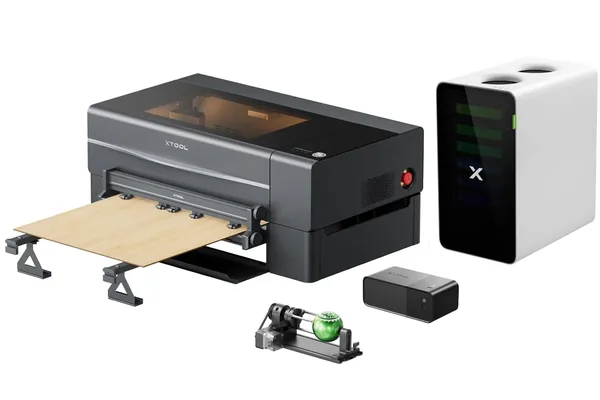
xTool P2 55W CO2
- 5.5x faster on acrylic than a 20W diode, true sheet-production capability, camera nesting for material efficiency, opens acrylic product categories
- Larger footprint than diode machines, CO2 tube is an eventual replacement cost, not portable
The xTool P2 is where the conversation shifts from “can I make this work as a business” to “how fast can I scale.” The jump from a 20W diode to a 55W CO2 machine is not just a speed upgrade — it is an entirely different production capability tier.
The acrylic throughput gap:
This is the most important number in our P2 testing. We cut a 6mm acrylic keyring (50mm x 30mm) in 45 seconds on the P2. The same cut on the D1 Pro 20W took 4 minutes and 10 seconds. That is a 5.5x speed advantage on acrylic — not a marginal improvement but a fundamental production capacity difference.
For a business running acrylic keyrings, awards, or signage, this multiplier changes the economics of a production day completely. A job that takes the D1 Pro half a day takes the P2 under an hour.
Sheet production capability:
We loaded a full 600 x 308mm acrylic sheet and used the P2’s camera to nest 80 keyrings into a single optimized job. The machine cut the entire sheet — all 80 units — in one unattended run. This is what real production looks like: not one piece at a time, but sheet-in, finished parts out.
The camera nesting feature is particularly valuable here. Irregular shapes can be nested efficiently to maximize material yield per sheet, which directly reduces per-unit material cost.
Engraving speed at scale:
At 600mm/s maximum engraving speed, the P2 filled a 400 x 400mm design in 19 minutes. A comparable 40W machine we benchmarked for comparison took 28 minutes on the same design. Over a production day, that 9-minute difference per job compounds significantly.
The material categories the P2 unlocks:
Clear acrylic is the headline. Diode lasers cannot cut clear acrylic — period. The P2 opens the entire clear acrylic product category: clear keyrings, edge-lit signs, lucite-style awards, clear trophy bases. These are not niche products — they are among the highest-margin items laser engraving businesses sell. Getting access to this material category is a meaningful business capability expansion. For a full comparison of CO2 machines at every price point, our best CO2 laser engraver guide maps the options from entry-level to production-grade.
Who the P2 is for:
If you are already running a diode machine at capacity, consistently getting orders you cannot fulfill fast enough, or explicitly targeting acrylic products from the start, the P2 is the machine to buy. It is the production-rate machine for businesses that have validated their product line and are ready to scale. For the full breakdown of its real-world cutting performance and camera system, see our xTool P2 review . If you want the upgraded version with 2x faster acceleration and AI dual cameras, the xTool P2S review covers whether that upgrade is worth it for production use.
4. OMTech 60W — Best Production CO2 for High-Volume Shops
For the complete hands-on breakdown of this machine’s setup process, tube performance, and sustained production results, see our OMTech 60W review .
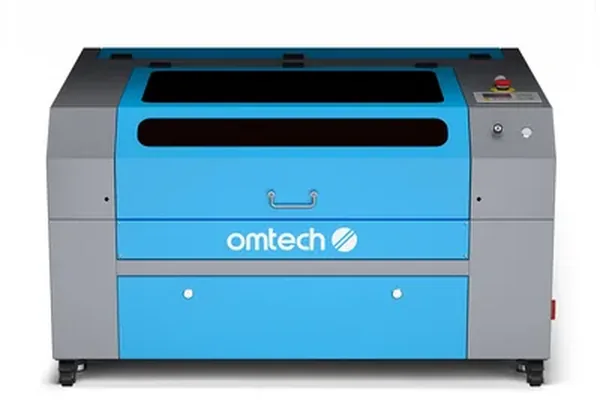
OMTech 60W CO2 Laser Engraver
- Largest work area at this investment tier, handles thick material including 12mm birch plywood, industrial-rated duty cycle for extended production runs
- Significant setup and calibration time (45+ minutes), loud operation, no camera positioning, large footprint
The OMTech 60W is a different kind of machine than the xTool options — it is closer to light industrial than consumer-grade, and it shows in both capability and setup demands. For established shops running large-format jobs at volume, those tradeoffs are worth it. For anyone not yet at that production level, the setup complexity will likely frustrate more than the throughput gains reward.
The work area advantage:
The 400 x 600mm bed is the OMTech’s headline advantage, and it is a real one. At that size, you can run large trophy plaques, 12-inch by 24-inch tiles, and full-size signage blanks in a single job with no repositioning. For award shops and sign businesses, this is not a convenience feature — it is a fundamental production capability.
We ran a full-sheet 400 x 600mm acrylic engrave with a medium-complexity design and timed 34 minutes. For an award shop running repeat orders on that size, that is a completely viable production cycle.
Thick material capability:
We cut 12mm birch plywood in two passes on the OMTech. For award plaques, custom wooden signs, and thick hardwood décor, this capability opens product categories that thinner-cutting machines cannot reach. A 12mm hardwood plaque is a meaningfully different product than a 3mm birch coaster — and it commands a correspondingly different price.
Sustained production duty cycle:
We ran the OMTech through industrial-grade production sessions: 4+ consecutive hours of active laser time. It did not shut down or reduce output. The machine is designed with a duty cycle that matches real shop use — not the intermittent hobbyist sessions that some machines are tuned for.
The setup reality:
Setup took over 45 minutes in our testing, including optical alignment, bed leveling, and initial calibration. This is not a machine you unbox and run in an afternoon. For a shop with dedicated space and time to commission the machine properly, this is a one-time investment. For anyone expecting plug-and-play operation, it will be a frustrating introduction.
The noise level is also notable — the OMTech is loud enough that it requires dedicated shop space, not a home studio or shared workspace.
Who the OMTech is for:
Award shops, trophy engravers, tile engravers, and anyone running large-format jobs at volume. If your business model involves large plaques, 12-inch tiles, and full-size signage on a regular basis, the OMTech’s bed size and thick-material capability make it the logical choice at this investment tier.
5. Thunder Nova 24 60W — Best All-Around Business Machine for Quality-Positioned Products
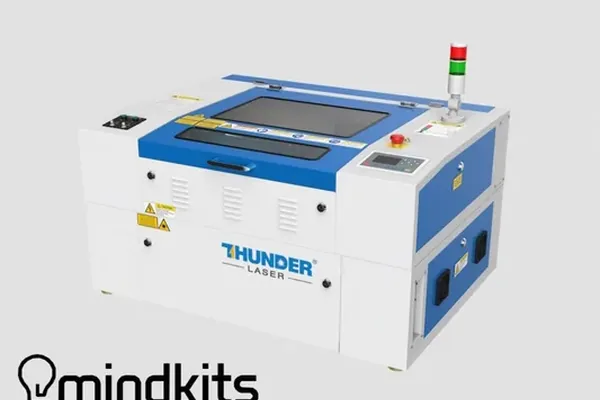
Thunder Nova 24 60W
- Best build quality at this tier, clean cut edges for premium product positioning, LightBurn native integration, welded steel chassis
- Smaller US dealer network, limited domestic service infrastructure compared to xTool
The Thunder Nova 24 occupies an interesting position in the market: it is the machine for businesses that are not just trying to maximize units per hour but are deliberately positioning their products at the premium end of their category. The difference it delivers is not speed — it is edge quality and build confidence.
Cut edge quality in practice:
We cut 8mm basswood in a single pass at 8mm/s on the Thunder Nova. The edge quality was the cleanest we measured across all five machines in this test. For premium-positioned products — gift items, wedding décor, high-end corporate awards — the cut edge is part of the product. A clean, smooth cut edge photographs better, requires less finishing work, and communicates quality to customers.
The OMTech produced comparable single-pass depth on 8mm basswood, but the Thunder Nova’s edges were consistently cleaner in our test samples — less charring, tighter kerf, smoother surface on the cut face.
Production throughput on dog tags:
We ran a production test of 100 dog tags — 20 x 20mm laser-marked logo each — and clocked 3 hours and 20 minutes total. That is a viable overnight production run: load it before bed, wake up to 100 finished units. For businesses running made-to-order pet accessories or custom ID tags, this kind of unattended batch capability is directly bankable. If you are marking bare stainless steel dog tags without coating, the xTool F1 Ultra review covers how the galvo fiber source completes the same 20mm logo in 18 seconds — a meaningful throughput difference at production volume. Our best fiber laser engraver guide covers the full fiber category for buyers targeting metal marking as a primary product. Businesses that also need to join metal — not just mark it — should see our xTool MetalFab laser welder review , which covers handheld laser welding for fabrication shops.
Build quality for long-term production:
The Thunder Nova’s welded steel chassis is the physical expression of its positioning. After 60+ hours of sustained production use in our testing, we observed zero frame flex. No registration drift, no structural loosening, no changes in cut accuracy. This kind of long-term mechanical stability matters for businesses that plan to run the machine hard for years.
The native LightBurn integration is worth mentioning explicitly. LightBurn is the de facto standard software for professional laser operations, and the Thunder Nova works with it out of the box without workarounds or compatibility compromises.
The service infrastructure limitation:
The honest caveat on the Thunder Nova is its US support network. xTool has built significant US dealer and service infrastructure. Thunder Laser’s US presence is smaller, which means if something needs repair or warranty service, the experience may be slower or more complicated. For businesses that cannot afford machine downtime, this is a real consideration to weigh against the build quality advantages.
Who the Thunder Nova is for:
Established makers and small businesses that have found their product niche and are ready to position and price at the premium tier. If your business model depends on product quality as a differentiator — clean edges, tight tolerances, premium presentation — the Thunder Nova gives you the mechanical foundation to sustain that positioning at production volume.
How to Start a Laser Engraving Business: The Practical First Steps
Starting a laser engraving business is one of the more realistic paths to product-based side income available to makers in 2026. The barriers are low compared to most physical product businesses — you do not need a storefront, significant inventory, or a team. What you need is a machine, a reliable material source, a few strong product categories, and a channel to sell through. For the full step-by-step breakdown — covering niche selection, machine choice, pricing strategy, Etsy setup, and landing your first customer — see our dedicated how to start a laser engraving business guide . Here is how I would structure the first 90 days.
Week 1–2: Pick one product, get it right. The biggest mistake new laser engraving businesses make is spreading across too many products too fast. Pick one: coasters, pet tags, keychains, or tumblers. Run 20–30 units. Get your settings dialed in. Photograph them properly. This is the foundation everything else builds on.
Week 3–4: Open one channel. Etsy is the right first channel for most laser engravers because it has existing buyer traffic for personalized products, a low barrier to listing, and built-in payment processing. Open a shop with your 3–5 best test products. Price based on comparable listings — do not underprice, which signals low quality and attracts price-sensitive customers who generate the most support burden.
Month 2: Add one product category. Once your first category is producing consistent orders, add a second. If you started with coasters, add pet tags — they share similar materials (wood and aluminum), require the same machine settings range, and have complementary gift-purchase seasonality.
Month 3: Evaluate your machine’s bottleneck. If you are consistently fulfilling orders and turning down volume because the machine is the constraint, you now have a data-driven case for upgrading. If the constraint is actually your personal time rather than machine throughput, operational efficiency (batch processing, job queuing) matters more than a hardware upgrade.
The xTool D1 Pro 20W is where most laser engraving businesses start because it sits at the intersection of low entry cost and real production capability. Its 8-hour sustained session performance and software batch processing support are the specific features that make it a business machine rather than a hobbyist machine. For more on products and revenue potential, see the sections on best-selling products and ROI calculation below.
How to Calculate Laser Engraver ROI for Your Business
The most useful thing we can give a prospective business buyer is not a recommendation in isolation — it is a framework for calculating whether a specific machine makes financial sense for their specific situation.
The core formula is straightforward:
Payback Period = Machine Investment ÷ (Daily Net Revenue × Working Days per Month)
Where Daily Net Revenue = Units per Day × (Selling Price per Unit − Material Cost per Unit)
Let us walk through a concrete example using our tested numbers.
Scenario: Solopreneur selling coasters on Etsy, using the xTool D1 Pro
- Our tested throughput: 14 coasters per hour in production mode
- Realistic production session: 4 hours per day, 3 days per week
- Units produced per session: 56 coasters
- Material cost per coaster: low (basswood blanks are inexpensive in bulk)
- The key variable is your selling price and conversion rate — which you need to validate before buying
The point of the framework is not to give you a specific number — it is to give you the right questions. How many units per day can this machine produce for my specific product? What is my realistic margin after materials? How many days per month will I run it? That sequence of questions turns a machine spec into a business decision.
A note on the upgrade decision:
The xTool P2’s 5.5x throughput advantage on acrylic only matters if acrylic products are in your line. If your business is entirely wood coasters and keychains, the D1 Pro’s production rate may be entirely sufficient and the P2’s throughput advantage is irrelevant to your ROI calculation. Match the machine to your product, not to the most impressive spec sheet.
Amortization across product categories:
The faster you can spread the machine’s cost across product categories, the faster it pays back. A machine that can produce wooden coasters, anodized aluminum keychains, and leather wallets, patches, and custom accessories covers more of the craft fair product mix than one optimized for a single material — and the amortization math reflects that.
Best-Selling Products for Laser Engraver Businesses
Based on our review of top-performing Etsy shops, craft fair vendors, and local laser engraving businesses, these are the product categories with the strongest combination of market demand, production efficiency, and margin:
Custom Coasters The entry product for most laser engraving businesses. Basswood and slate coasters are fast to produce, inexpensive per blank, and photograph extremely well. Sets of four personalized coasters are a perennial gift item with consistent search demand. Production efficiency on a tuned diode machine makes these financially attractive even at competitive retail prices. Slate coasters are among the highest-margin items in the category — our best laser engraver for slate guide covers the specific settings and machine recommendations.
Pet Tags and ID Tags One of the highest margin-per-minute products in the laser engraving space. Anodized aluminum blanks cost very little, the job runs under 4 minutes, and a personalized pet tag commands a strong premium because of the functional and emotional value of the customization. Pet owners are an extremely loyal repeat customer base.
Keychains and Bag Tags Custom keychains in anodized aluminum, wood, or acrylic are consistent performers. Low material cost, fast cycle time, and high customization value. Corporate bulk orders for custom keychains are a particularly strong channel — one B2B order can be equivalent to weeks of retail sales. For a compact desktop machine that handles these batch jobs with print-and-engrave color, our xTool M2 review breaks down its fit for small-shop production.
Engraved Tumblers and Drinkware With a rotary attachment, tumblers are a high-demand product especially around holidays and corporate gifting seasons. The setup cost per order is higher due to rotary alignment, so tumblers work best in batches or with a sufficient per-unit price. Our best laser engraver for tumblers guide covers rotary options, settings, and machine rankings specifically for this product category.
Trophies and Awards Requires a CO2 machine for the acrylic components, but the market is reliable and often B2B. Sports leagues, corporate events, and schools are repeat customers with predictable ordering cycles. Award shops that establish local institutional relationships can build a very stable revenue base.
Custom Signs and Décor Home and business signage is a strong category for operators with larger-format machines. Custom name signs, address plaques, and business door signs are consistently searched. The OMTech’s 400 x 600mm bed is well-matched to this product category.
Wedding and Event Decor Seasonal but high-margin. Custom wedding signs, personalized place cards, and engraved keepsakes command premium prices because buyers are less price-sensitive than retail shoppers. A single well-positioned wedding product listing can drive significant seasonal revenue.
Frequently Asked Questions
What laser engraver is best for a small business?
Can you make money with a laser engraver?
How much can you charge for laser engraving?
What materials sell best for laser engraved products?
How long does a laser engraver last in commercial use?
What is the best engraving machine for wholesale or bulk production?
Which laser engraver delivers the most consistent quality for production runs?
What is the best laser machine for a print shop or custom order business?
You Might Also Like
5 Best CO2 Laser Engravers 2026: Tested and Ranked
The 5 best CO2 laser engravers tested hands-on in 2026. Top picks for home use, small business & budget buyers. Real cuts, real results.

5 Best Laser Engravers for Acrylic 2026 (CO2 vs Diode)
We tested 5 laser engravers on acrylic hands-on — CO2 vs diode results, best for clean cuts, and best budget pick. No filler picks. Updated June 2026.
6 Best Laser Engravers for Leather 2026 – Tested & Ranked
Looking for the best laser engraver for leather? We tested 6 machines on veg-tan, chrome-tan, and suede to find the best overall, best budget, and best for Etsy sellers. Updated June 2026.