Hanboost T1 Mini Laser Engraver Review 2026: Worth It?
Hanboost T1 mini laser engraver review: specs, real use cases, small business fit, pricing tiers, and our honest verdict on this pocket-sized machine.
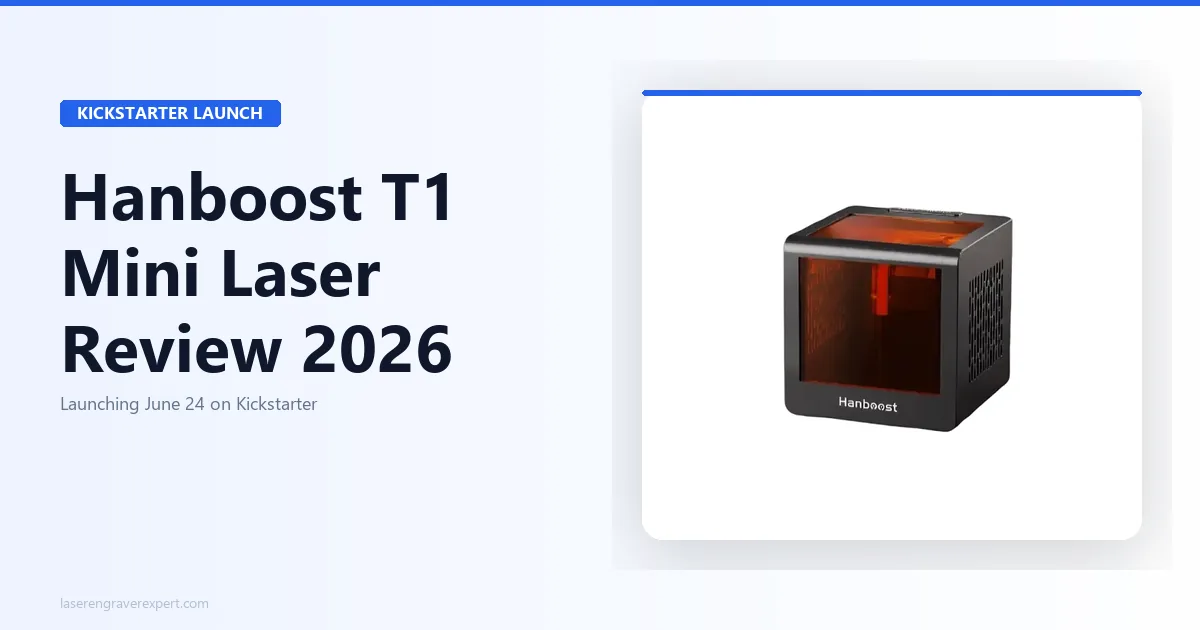
Most mini laser engraver reviews stop at the specs and never answer the only question that actually matters: can you take this thing anywhere, set it up in two minutes, and make something you’re proud to give someone?
Most other small-format engravers either require you to be tethered to a desk with a dedicated power adapter, or they’re so underpowered that the results look like a printer smudge on your material. The “portable” ones are usually just smaller, not actually portable.
I’ve been following the Hanboost T1 closely in the lead-up to its Kickstarter launch on June 24, 2026. What caught my attention isn’t the size — plenty of small machines exist. It’s the combination: USB-C power (real power bank operation), a fully enclosed safe work area with an OD4+ window, genuine LightBurn support, and swappable laser heads. That combination at sub-$100 Early Bird pricing is worth a serious look.
Here’s everything you need to know before June 24th.
What Is the Hanboost T1 Mini?
The Hanboost T1 Mini is Hanboost’s entry into ultra-portable laser engraving — a 60×40mm work area packed into a 115×115×115mm cube that weighs approximately 400g. For reference, that’s roughly the weight of a 355mL soda can. It’s genuinely pocket-size: it fits in a jacket pocket or a side-pouch of a backpack, which is exactly why it’s landed on DIY enthusiasts’ and makers’ radars ahead of launch.
There are two configurations to know about. The standard T1 ships with a 500mW laser head. The Hanboost T1 Pro is the same body, connectivity, and software — just fitted with a more powerful, user-swappable 1.6W head for faster cycle times on harder materials. More on how to choose between them below.
Hanboost is not a new brand. They’ve previously launched creator-focused tools for the maker and 3D printing community via Kickstarter, with a track record of delivering on campaigns. Their stated philosophy is worth noting: “Reliable Quality, Innovative Tools, Excellent Support, Loved by Makers.” That’s not just marketing copy — it tells you who they’re building for. This isn’t a consumer toy brand trying to sell to crafters. It’s a maker-tools company building for people who will actually use the machine.
The T1 is best suited for: beginners who want a safe first laser experience, makers who want an engraver they can take anywhere, small business owners adding personalization to small items, and gift-givers who want to make things rather than buy them.
The 60×40mm work area is the defining constraint. If you need to engrave a cutting board, a tumbler, or anything bigger than a phone case, the T1 is not your machine. If you want to engrave keychains, aluminum business cards, phone cases, small photo frames, leather patches, or botanical prints — it is purpose-built for exactly that.
Reserve the Hanboost T1 for $1 →
Full Specs
| Spec | T1 | T1 Pro |
|---|---|---|
| Laser Type | Blue Diode | Blue Diode |
| Electric Power | 10W input | 10W input |
| Optical Power | 500mW | 1.6W |
| Engraving Area | 60 × 40mm | 60 × 40mm |
| Dimensions | 115 × 115 × 115mm | 115 × 115 × 115mm |
| Weight | ~400g | ~400g |
| Power Supply | USB-C (power bank, laptop, wall) | USB-C |
| Connectivity | USB-C + WiFi | USB-C + WiFi |
| Precision | 0.05mm | 0.05mm |
| Laser Life | ≥8,000 hours | ≥8,000 hours |
| Software | LightBurn, LaserGRBL, MKSLaser App | LightBurn, LaserGRBL, MKSLaser App |
| OS Support | Windows, Mac, Android, iOS | Windows, Mac, Android, iOS |
| Safety | Enclosed, OD4+ window, tilt detection, active cooling | Same |
Suggested Machines
The T1 is a great pocket engraver, but its 60×40mm bed is tiny. If you need a full-size machine you can buy and use today, these are our top tested picks by use case:
Best full-size upgrade: the Sculpfun S30 Pro Max — huge 600×600mm bed, automatic air assist, and genuine single-pass cutting.
Best safe, enclosed engraver: the xTool S1 — fully enclosed Class 1 diode with a built-in camera and real cutting power for larger jobs.
Best enclosed all-in-one: the xTool M1 — a Class 1 enclosed machine that both laser-engraves and blade-cuts, for larger keepsakes, stickers, and mixed-material craft.
Deep Dive: Key Features
Portability and Power Bank Operation
This is where the T1 separates itself from every other “mini” engraver I’ve seen. USB-C power is not a gimmick here — the T1 draws 10W of electrical input, which any USB-C power bank with Power Delivery can handle. You don’t need a specific brand of power bank, you don’t need a dedicated adapter, and you don’t need to be near a wall.
Think about what that actually unlocks. You can engrave at a craft fair without hunting for an outlet. You can demo a personalization service at a market stall using only your phone and a pocket-sized machine. You can take the T1 to a friend’s place, a kitchen table, or a weekend workshop with nothing more than what fits in your bag.
Compare this to something like an xTool D1 Pro, which is an excellent open-frame engraver but requires mains power and has a footprint that needs a dedicated desk space. The T1 is solving a completely different problem. It is not a D1 Pro alternative — it is an engraving tool you take with you.
The included WiFi connectivity extends this further. Pair it to your phone via the MKSLaser App and you have a fully wireless workflow. Import a design, preview the placement, engrave. No laptop required.
T1 vs T1 Pro: Precision and Swappable Laser Heads
The T1 achieves 0.05mm precision. That’s fine enough to reproduce photo-quality gradients on small surfaces and to engrave readable text at small point sizes on aluminum cards. For the materials and item sizes the T1 is designed for — keychains, phone cases, small frames — 0.05mm is more than adequate, whether you’re running the standard head or the Pro head.
The swappable laser head system is genuinely useful. The standard head ships at 500mW optical output. The Hanboost T1 Pro upgrades that to 1.6W. Both use the same body, same connectivity, same software — you swap the head and you’re done. This matters for a few reasons:
First, 500mW is sufficient for engraving anodized aluminum cards, leather, kraft paper, and thin plywood. If you’re engraving on harder or thicker materials and want faster cycle times, the 1.6W Pro head gives you that without buying a new machine. Second, the modular approach means Hanboost can introduce future heads without retiring the platform. That’s a meaningful longevity argument for a Kickstarter purchase.
So which should you reserve — the T1 or the T1 Pro? If your projects are mostly keychains, aluminum cards, leather patches, and kraft paper — the standard 500mW head handles all of it comfortably, and it’s the lower-cost entry point. If you’re planning to engrave thicker plywood or MDF regularly, or you just don’t want to think about upgrading later, the T1 Pro’s 1.6W head is the safer reserve. Because the head is swappable, this isn’t a permanent decision either way — it’s a question of what you need on day one.
The laser life is rated at a minimum of 8,000 hours on either head. At one hour of daily use, that’s over 21 years of operation. You’re not going to wear this machine out.
Safety System
The T1’s safety system is the best argument for choosing it over a cheaper open-frame mini engraver. There are four layers:
Fully enclosed work area. The laser stays inside. Stray reflections stay inside. Fumes are contained until the cooling fan vents them. This matters especially for anyone using the T1 in a home environment without a dedicated ventilation setup.
OD4+ rated laser safety window. The viewing window meets OD4+ standards, which means the laser energy transmitted through it is reduced by a factor of 10,000 or more. You can watch the engraving process directly through the window without laser safety goggles. This is a significant usability improvement over budget open-frame machines where bare-eye operation is genuinely dangerous. If you’re comparing safe first machines, our best laser engravers for beginners guide covers the full range from $89 to $1,200.
Tilt detection. If the unit tips beyond a safe angle — knocked off a table, placed on an unstable surface, moved mid-job — the laser cuts out automatically. This is a real safety feature, not a marketing line. On a device this portable, used on non-ideal surfaces like market stalls or folding tables, tilt protection matters more than it would for a desk-mounted machine.
Active cooling fan. The fan manages operating temperature and clears smoke from the work area, which also keeps the engraving surface cleaner during longer jobs. It is not a substitute for ventilation in an enclosed room — you still want airflow — but it handles the immediate smoke management that otherwise requires a separate exhaust setup.
Together these four features mean the T1 is a genuinely safe machine for a first-time user. Not “safe if you follow every precaution” — actually safe by design.
Software Ecosystem
The T1 supports three distinct software paths:
LightBurn is the professional standard for laser engraving. If you already use LightBurn for another machine, the T1 will feel immediately familiar. If you don’t use LightBurn yet, it’s a $60 one-time purchase that works across every LightBurn-compatible machine you’ll ever own — worth it the moment you get serious about laser work.
LaserGRBL is free, open-source, and handles basic engraving tasks well. It is less capable than LightBurn for complex designs but perfectly usable for simple text, logos, and file imports. For beginners who want zero software cost, LaserGRBL is the starting point.
MKSLaser App (iOS and Android, WiFi) is the mobile workflow. Pair your phone to the T1 over WiFi, import or create a design in the app, preview placement, and engrave — no laptop in the loop. For the craft fair and on-the-go use cases, this is the key feature. The three-step workflow (Import/Create → Preview → Engrave) is designed to be approachable for someone who has never used a laser engraver before.
Scale-Marked Focus Adjustment
Focus is one of the most overlooked factors in laser engraving quality. Defocus by even half a millimeter and you lose line sharpness — your text blurs, your photo gradients lose tonal separation, your fine details turn muddy.
The T1 uses a vertical focus adjustment mechanism with scale markings. You set the focus once for a given material thickness, note the position on the scale, and repeat it exactly next time. No re-focusing from scratch every session, no guessing whether you’re at the same height as last time.
This sounds like a small thing until you’ve spent 20 minutes dialing in focus on a cheaper machine only to find the results are still slightly soft. The scale markings turn a frustrating variable into a repeatable setting. For someone running the same material repeatedly — say, engraving aluminum keychains in batches — this is a genuine time-saver.
1,000+ Free Design Library
Every T1 ships with access to over 1,000 free engraving design files from day one. This removes a real barrier for new users who know they want to engrave things but don’t have design software experience or a library of ready-to-use files.
Practically speaking, this covers: monograms, botanical designs, geometric patterns, holiday and occasion art, basic logo templates, and text layouts for common use cases (keychains, frames, name tags). You’re not starting from a blank canvas. You can start engraving your first afternoon.
For experienced users, LightBurn and LaserGRBL will handle your own design files anyway. But for a beginner picking up the T1 as their first engraver, having 1,000+ files available immediately means you can spend your first sessions learning the machine rather than learning design software simultaneously.
What Can the Hanboost T1 Make? Real Use Cases
Leather and PU — Keychains and Patches
Leather is one of the most satisfying materials to engrave. The diode laser chars the surface cleanly, producing deep contrast with almost no prep. With the T1’s 60×40mm work area, a standard keychain blank fits perfectly.
Imagine personalizing a set of leather keychains for a friend’s wedding party — initials, a small botanical motif, or a date. Twenty minutes of setup, one design file from the included library, and you’ve made something that would cost $15–$25 each from an Etsy seller. The T1 makes that achievable in your kitchen.
PU (synthetic leather) behaves similarly. Phone wallet cases, luggage tags, small patches for jackets — all within the T1’s confirmed material list.
Plywood — Photo Frames and Small Panels
Thin plywood and MDF are workhorses for the T1. The 60×40mm engraving field maps well to small decorative frames, ornament panels, and gift tags. Engrave a name and date into a small frame and you have a personalized wedding favor that took two minutes per piece.
For craft fair sellers, thin plywood panels with nature scenes, quotes, or monograms are fast to produce and easy to price. The T1’s portability means you could theoretically engrave live at a market stall — a real attention driver.
Aluminum Cards — Business Cards and Gift Cards
Anodized and coated aluminum cards engrave cleanly under a diode laser. The anodizing ablates to reveal the base metal, giving crisp white-on-black or white-on-color contrast. Business cards, loyalty cards, membership cards, custom gift cards — the 60×40mm area is almost exactly standard business card dimensions.
For a small business wanting branded metal business cards without ordering a minimum quantity from a print house, the T1 is a genuinely interesting option. Engrave individual cards to order, on demand, with exactly the personalization each client wants.
Kraft Paper — Packaging and Gift Tags
Kraft paper engraves quickly and at low power settings. Custom gift tags, branded packaging inserts, personalized thank-you cards for Etsy orders — these are fast jobs that add perceived value to a product without significant material cost.
If you run an Etsy shop or a small product business, adding a laser-engraved personal touch to packaging is the kind of detail customers photograph and share. The T1 makes that achievable without a large engraver taking up your workspace.
Leaves — Botanical Art
This one is genuinely unusual. The T1’s confirmed material list includes leaves, and the results from leaf engraving are striking — intricate patterns burned into the leaf surface that look impossible to produce by hand. Framed botanical art pieces made from engraved leaves have a strong market in handmade gift shops and on Etsy.
The T1’s 60×40mm field suits most standard leaf sizes. It is a niche use case, but one that produces a finished product you simply cannot make with any other common craft tool.
Phone Cases (Hard-Shell Plastic)
Custom phone case engraving is one of the most popular personalization services at craft fairs and pop-up markets. Hard-shell plastic cases engrave cleanly under the diode laser, and the 60×40mm area covers the main panel of most case styles.
Names, initials, short quotes, small illustrations — any of these can be engraved in under five minutes per case. At a craft fair with foot traffic, this is a conversion machine. You take the case, engrave it in front of the customer, hand it back. That kind of live demonstration sells the product and the experience at the same time.
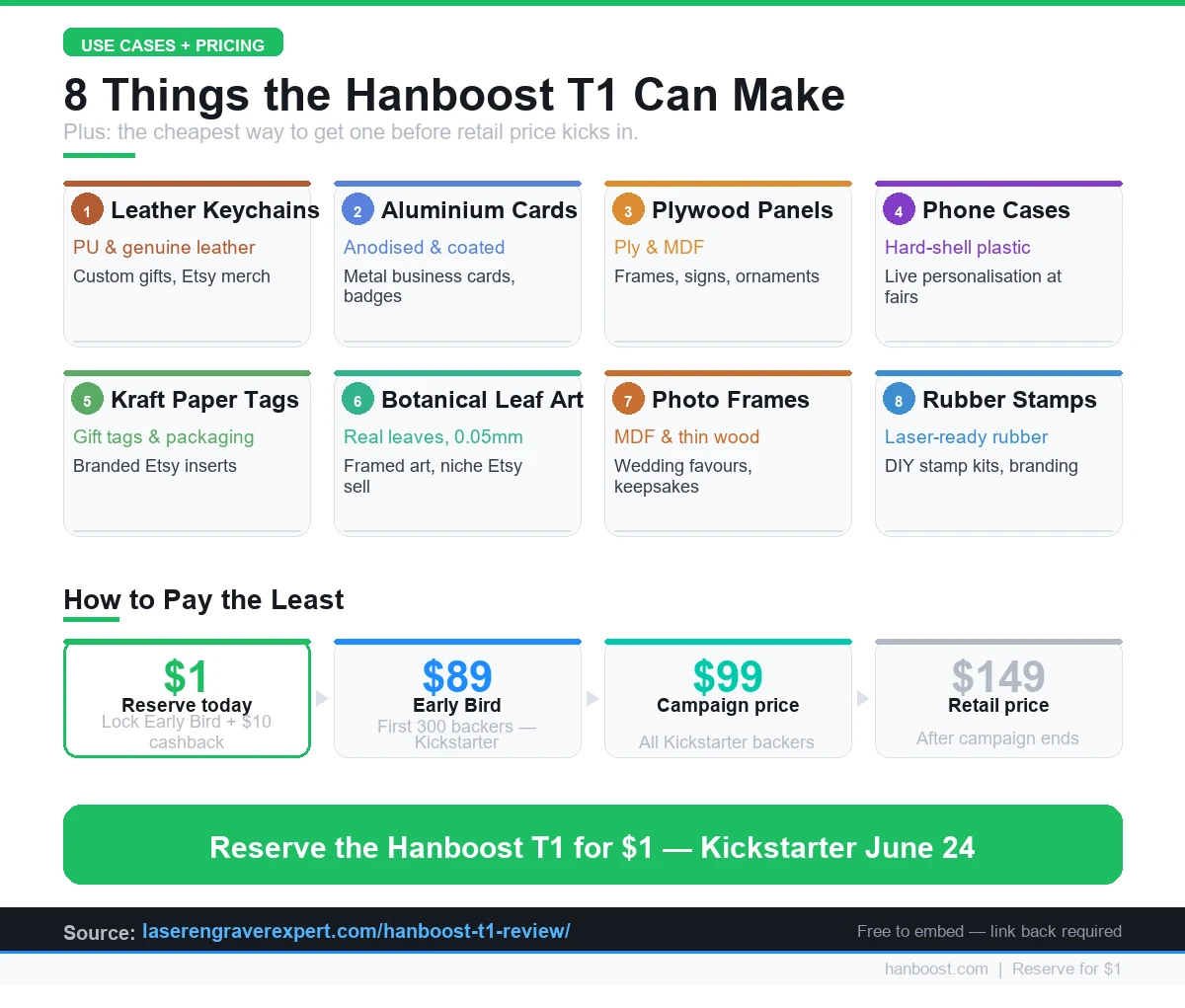
Using this infographic? Click to get the embed code →
<a href="https://laserengraverexpert.com/hanboost-t1-review/">
  <img src="https://laserengraverexpert.com/img/infographics/hanboost-t1-what-to-make-pricing.webp"
       alt="8 things you can make with the Hanboost T1 mini laser engraver — Kickstarter pricing"
       width="1200">
</a>
<p>Source: <a href="https://laserengraverexpert.com/hanboost-t1-review/">LaserEngraverExpert — Hanboost T1 Review</a></p>
Small Business Applications
The T1 is not a production workhorse. It has a 60×40mm work area and it’s powered by USB-C. But there is a specific category of microbusiness where those constraints are irrelevant and the portability is a genuine competitive advantage.
Personalized gift makers. Keychains, leather patches, aluminum cards, small frames — these are the staple products of Etsy personalization shops. The T1 handles all of them. For someone starting a personalization side business from a home setup, the T1 is a low-commitment entry point that doesn’t require clearing a desk or running a power cable. You can engrave on the kitchen table, pack it away when you’re done, and ship the orders the next morning.
Craft fair and market vendors. The live personalization angle is real. Customers at markets will pay a premium for something they watched being made in front of them. The T1 + a power bank + a phone with the MKSLaser app is a complete portable studio. No table extension, no power strip, no laptop. That setup has a very low bar to entry.
Wedding and event favors. Engraved leather keychains, aluminum cards with guest names, small plywood frames with dates and monograms — all of these are confirmed T1 materials and all of them command strong pricing at wedding favor scale. An order of 50 personalized keychains at $8–$12 each is a $400–$600 job on materials that cost under $50. The T1’s repeatability (scale-marked focus, consistent power settings) makes batch production manageable.
Branded merchandise for small local businesses. Cafés, barber shops, boutique stores — many want branded merchandise but have no budget for minimum order quantities. The T1 lets you offer small runs of custom aluminum cards, leather key fobs, or branded packaging inserts that a print shop would require 250-unit minimums to produce. The economics work at 10–20 units.
For more on building out a laser engraving business from the ground up, our how to start a laser engraving business guide covers the full kit list and pricing strategy.
The honest caveat: if your business grows to the point where you need to engrave 200+ items per day or work on pieces larger than 60×40mm, you’ll outgrow the T1 and want to look at something like the xTool D1 Pro . The T1 is the right tool to start with and validate demand before that investment.
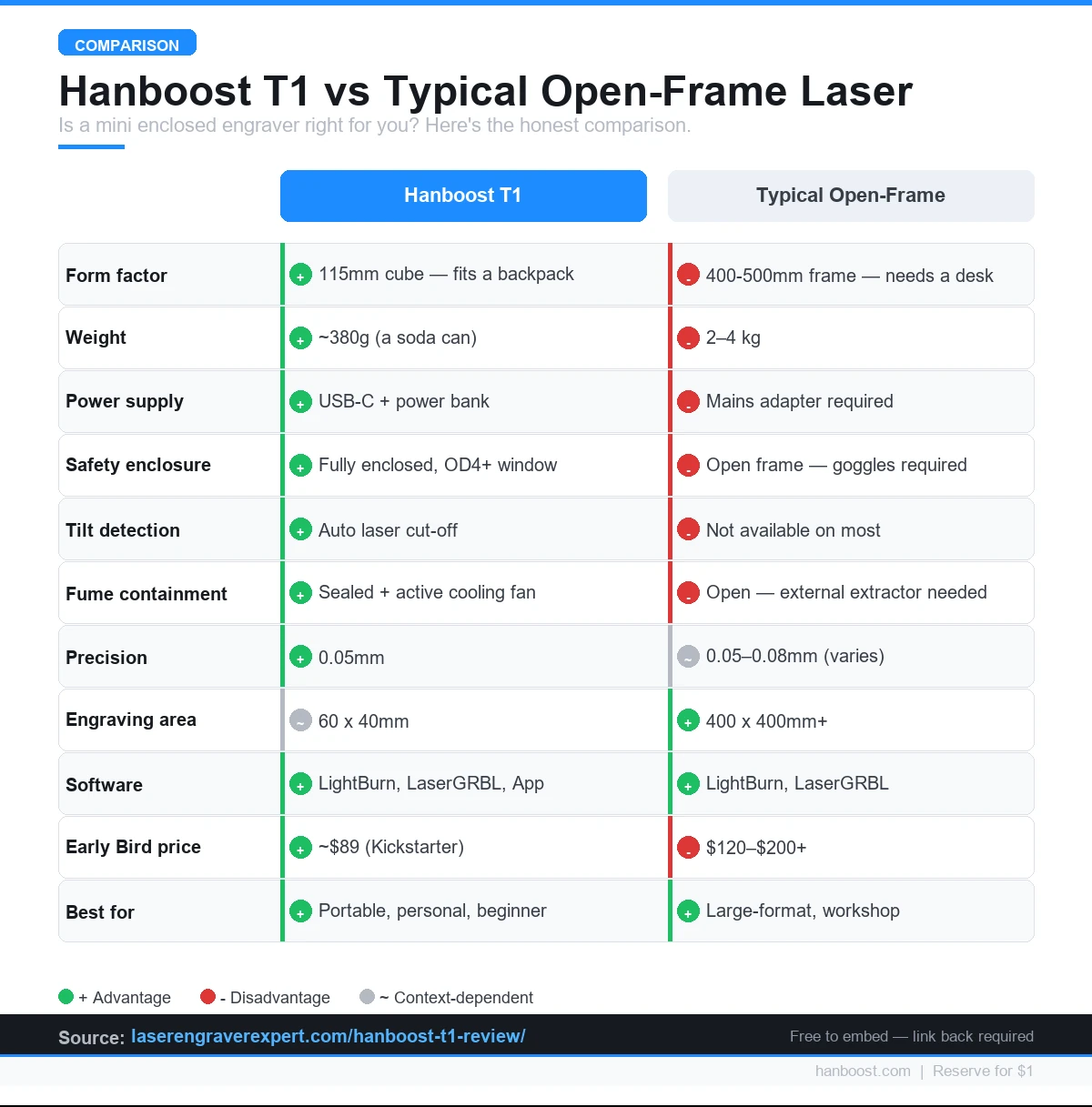
Using this infographic? Click to get the embed code →
<a href="https://laserengraverexpert.com/hanboost-t1-review/">
  <img src="https://laserengraverexpert.com/img/infographics/hanboost-t1-vs-open-frame-comparison.webp"
       alt="Hanboost T1 vs typical open-frame laser engraver — portability, safety, price comparison"
       width="1200">
</a>
<p>Source: <a href="https://laserengraverexpert.com/hanboost-t1-review/">LaserEngraverExpert — Hanboost T1 Review</a></p>
Who Should Back the T1 — and Who Shouldn’t
Back the T1 if you are:
At $89 Early Bird, the T1 is also the most affordable option in our best laser engravers under $500 guide — and the only one you can fit in a backpack pocket.
A complete beginner. The T1 is the safest first laser engraver I can recommend. The enclosed design, OD4+ window, and tilt detection remove the main risk factors that make open-frame machines genuinely dangerous for first-time users. The included 1,000+ design files and three-step workflow mean you are engraving on day one, not week three. See how it stacks up against other options in our best laser engravers for beginners roundup.
A maker who values portability above work area. If your constraint is space, travel, or needing to take your engraver to multiple locations, no other machine in this price range offers what the T1 offers — USB-C power, 400g weight, 115mm cube form factor, WiFi connectivity.
Someone who wants to add personalization to small items. Keychains, aluminum cards, leather patches, phone cases — if this is your use case, the T1’s 60×40mm area is not a limitation, it’s exactly right. There is no reason to buy a 430×390mm machine for keychain-scale work.
Someone who works with thicker plywood, MDF, or wants faster cycle times. This is where the Hanboost T1 Pro configuration makes sense — same body and workflow, just a 1.6W head instead of 500mW. Reserve the Pro head if you already know you’ll be pushing past thin materials regularly.
A gift-giver or hobbyist who wants to make things. The T1 is the kind of tool that changes how you think about gifts. Instead of buying something, you make it. That shift is meaningful and the T1 is genuinely accessible to someone with zero prior laser experience.
Do not back the T1 if:
You need to engrave anything larger than approximately 60×40mm. This is the hard limit. A cutting board, a tumbler, a phone case wider than 60mm on either axis — none of these fit. The T1 is explicit about its work area and I won’t pretend otherwise. If your primary use case involves medium-to-large items, look at our suggested machines above — the Sculpfun S30 Pro Max or xTool S1.
You need cutting, not just engraving. The T1 is an engraver. At 500mW (standard head) or 1.6W (Pro head), it is not rated for cutting through plywood, leather, or acrylic. If you need to cut shapes out of material, this is the wrong tool.
You need to engrave metals beyond coated or anodized surfaces. The T1 engraves anodized aluminum and coated metal cards cleanly. Bare stainless steel, raw aluminum, or other uncoated metals require a fiber laser — an entirely different technology at a much higher price point. Our diode vs CO2 vs fiber laser comparison explains exactly where each type applies.
Kickstarter Pricing Breakdown
The T1 launches on Kickstarter on June 24, 2026. The pricing tiers are straightforward:
| Tier | Price | Who Gets It |
|---|---|---|
| $1 VIP Reservation | $1 now | Anyone who reserves before launch |
| Early Bird | ~$89 | First 300 backers after June 24 |
| Kickstarter Price | ~$99 | Remaining campaign backers |
| Retail | $149 | Post-campaign, direct/Amazon |
The $1 reservation is the obvious move. Here is exactly what it unlocks:
- $10 cashback applied at delivery — effectively brings Early Bird price to ~$79
- 1,000+ free design files from day one — normally sold as an add-on by other brands
- Early Bird price lock — when the campaign goes live, you get the ~$89 tier regardless of whether the first 300 slots fill before you check your email
The $60 delta between Early Bird (~$89) and retail ($149) is real. Kickstarter campaigns for creator tools frequently sell out Early Bird tiers within the first 48 hours of launch. If you’re planning to buy the T1 eventually, the $1 reservation is a $60 insurance policy.
For context, the T1 at $89 Early Bird is priced below any comparable enclosed mini engraver I’ve seen. The closest competitor with an enclosed design and safety glass typically starts at $150+. You’re paying less for more safety features, genuine LightBurn support, and a design library included. That’s a strong value proposition.
Frequently Asked Questions
When does the Hanboost T1 launch on Kickstarter?
What is the engraving area of the Hanboost T1?
Can the Hanboost T1 run off a power bank?
Is the Hanboost T1 safe to use without goggles?
What software does the Hanboost T1 support?
What is the difference between the T1 and the T1 Pro?
What materials can the Hanboost T1 engrave?
What does the $1 Kickstarter reservation actually get you?
What is the Hanboost T1 Mini?
Is there a Hanboost T1 Pro?
How portable is the Hanboost T1 (pocket-size)?
Verdict
You’ve read this far, which means you’re trying to decide whether to put down $1 before June 24 or wait.
Here’s how to think about it:
If you want a genuinely portable engraver you can take anywhere — craft fairs, a friend’s place, a kitchen table — the T1 is the only enclosed machine at this price that runs on a power bank. There is no comparison at sub-$100.
If you’re a complete beginner and you want a safe, approachable first laser with included design files and a mobile app workflow, the T1 is built for you. The OD4+ window and tilt detection mean you won’t accidentally hurt yourself while you’re learning.
If you need to engrave items larger than 60×40mm, stop here. The T1 is not that machine. Look at the xTool D1 Pro or the xTool S1 for larger work areas.
If you’re deciding between the $1 reserve and waiting: the $1 gets you $10 cashback plus $60 off retail when you convert to a backer on launch day. The math is clear. You spend $1 now to save $60 later.
If you’re still comparing options across the full market, our complete guide to the best laser engravers covers every category from ultra-portable minis to industrial CO2s.
The Hanboost T1 is a focused tool built for a specific person and a specific set of tasks. It doesn’t try to be a production machine. It tries to be the best possible portable personal engraver under $100, and from everything I’ve seen, it delivers on that.
You Might Also Like
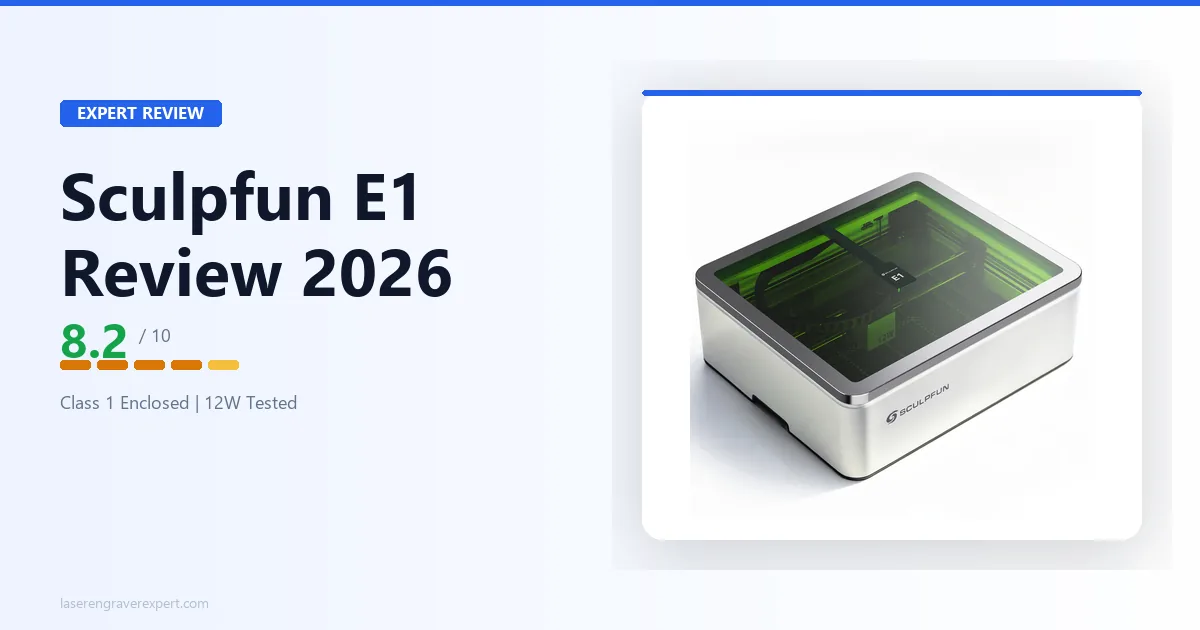
Sculpfun E1 Review 2026: A Compact Class 1 Diode Laser Worth Considering?
Sculpfun E1 review: fully enclosed Class 1, CoreXY motion, 12W diode, built-in camera. Honest breakdown of what it does well and where it falls short.
LaserPecker LP4 Review 2026: Is It Really Worth $1,199?
LaserPecker LP4 review: a close look at this dual-source LP4 laser engraver — 10W diode plus 2W IR for metal. Specs, honest verdict, who should buy it at $1,199.
Best Sculpfun Laser Engraver 2026: Full Lineup Compared
Best Sculpfun laser engraver 2026: full lineup compared — E1, E1 Pro, S9, S30 Pro Max, S30 Ultra, and SF-A9, ranked by what each model does best.