Disclosure: This article contains affiliate links. If you buy through my links, I may earn a small commission at no extra cost to you.
If you’ve been shopping fiber lasers for jewelry work, you’ve probably hit the same wall a lot of buyers do: positioning specs that look great on paper and drift once the source heats up mid-run. This OMTech MOPA 100W Split review covers the manufacturer’s specs and owner-reported results for the split-body design that solves that problem — the tightest ±0.1μm accuracy rating of any fiber laser in this lineup.
OMTech MOPA 100W Split Specifications and Price
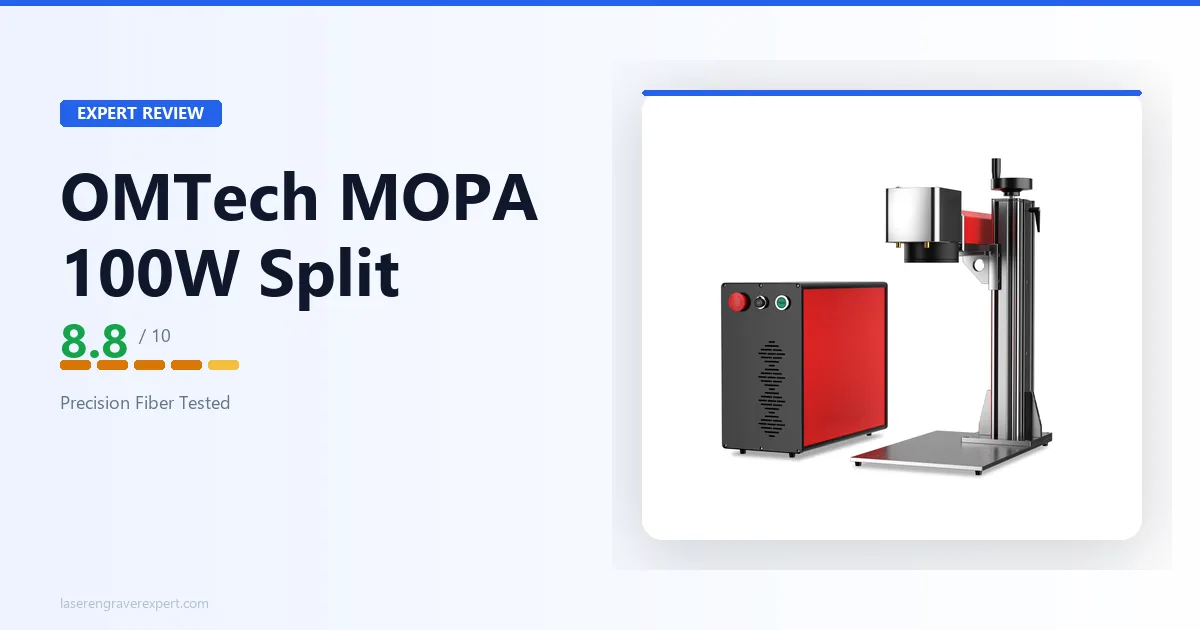
At $6,099, the OMTech MOPA 100W Split price sits well above entry and mid-tier MOPA machines — and the spec sheet below is where that number gets justified. The OMTech MOPA 100W Split is a 100W JPT MOPA fiber laser engraver built around a split-body architecture.
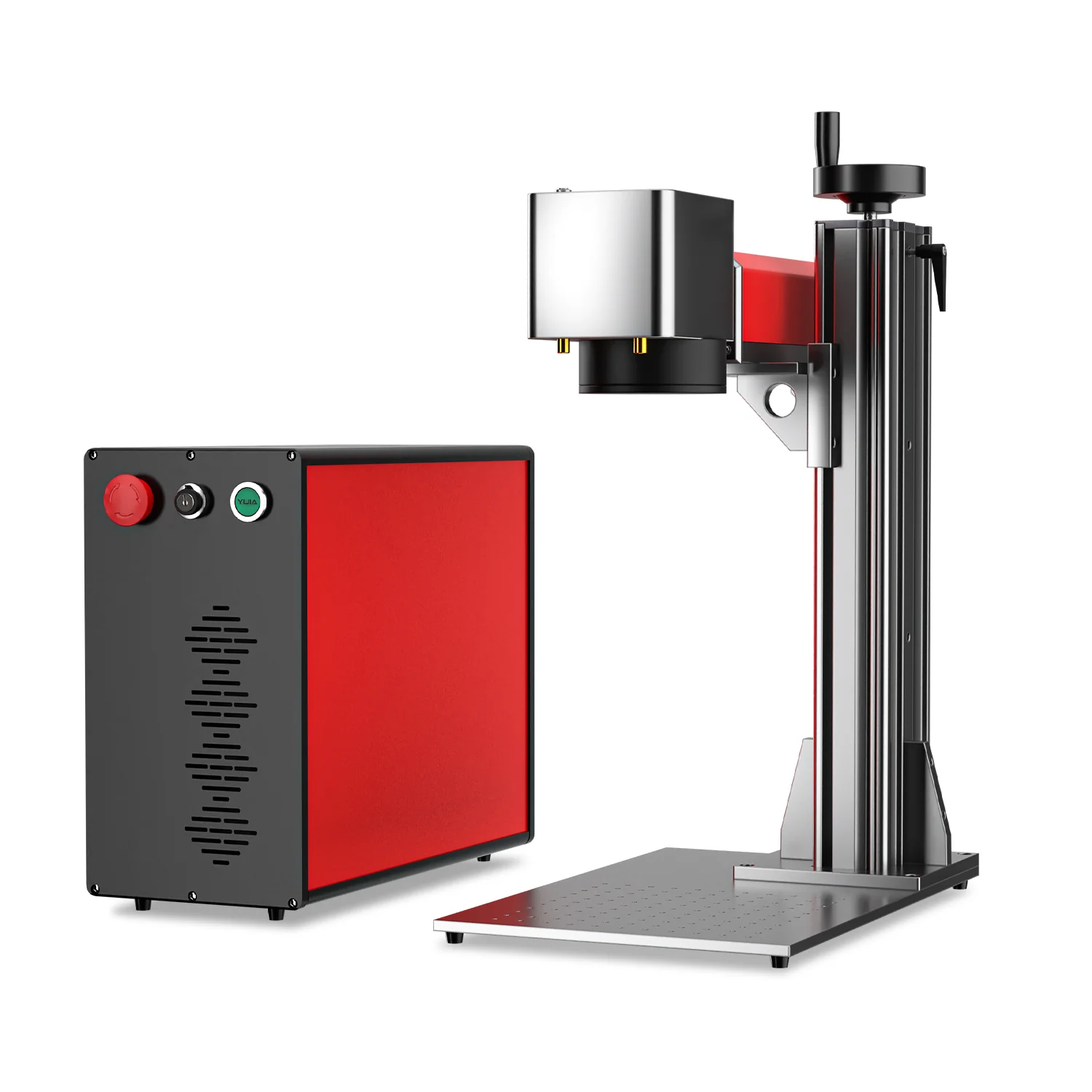
The laser source unit is physically separate from the galvo scanning head, connected by cabling, which is standard practice on industrial fiber systems.
That separation is why this machine posts a positioning accuracy figure no other machine in our best fiber laser engraver guide can match.
If you’re still deciding whether fiber is even the right laser type for your materials, our diode vs CO2 vs fiber breakdown covers that decision first. Here’s the full spec sheet.
| Specification | Detail |
|---|---|
| Laser Source | JPT MOPA |
| Laser Type | MOPA Fiber Laser, 100W |
| Galvanometer | Galvo-Tech scanner |
| Wavelength | 1064nm |
| Marking Area | 110 × 110mm (4.3 × 4.3 in.) or 175 × 175mm (6.9 × 6.9 in.) — interchangeable lenses |
| Max Marking Speed | 10,000mm/s |
| Max Marking Depth | 0.15mm |
| Positioning Accuracy | ±0.1μm (±0.0001mm) |
| Laser Frequency | 1–4000kHz |
| Pulse Width | 2–500ns |
| Estimated Laser Source Life | 100,000 hours |
| Cooling | Air cooling |
| Design | Compact split-body — laser source unit separate from galvo scanning head |
| Software | EZCAD2 (bundled), LightBurn compatible |
| Operating System | Windows XP, Vista, 7, 8, 10 (32/64-bit) |
| Supported File Types | AI, BMP, DX, DXF, GIF, JPG, PLT, PNG, TGA, TIF |
| Machine Dimensions | 570 × 350 × 650mm |
| Net Weight | 35kg |
| Package Dimensions | 780 × 460 × 570mm |
| Package Weight | 50kg |
| Warranty | Manufacturer warranty (varies by region) |
| Price | $6,099 |
OMTech MOPA 100W Split Setup and First Use: The Split-Body Difference
This is where the OMTech MOPA 100W Split immediately separates itself from every all-in-one fiber laser in this category — including its own sibling, the OMTech MOPA 60W . Setup isn’t just unboxing a single enclosure and plugging in a power cord.
Positioning the Two Units
The laser source unit and the galvo scanning head arrive as two physically distinct components, connected by dedicated cabling. You’re not assembling a machine so much as positioning a small production cell:
- Source unit — sits wherever makes sense for airflow and access
- Galvo head — mounts over your actual work area on its own stand or bracket
- Cable run — plan the distance between the two units before you start; budget more bench or floor space than a compact all-in-one unit like the xTool F1 Ultra needs
It’s not a complicated process, but it’s a different mental model than “open the box, everything’s in one housing.” If you’ve only ever set up desktop fiber lasers, this is closer to setting up a small industrial workstation.
From Cabling to First Mark
Once both units are positioned and cabled, the workflow converges with any other fiber laser: connect via USB, load EZCAD2, run your focus and calibration routine, and you’re marking.
The 100,000-hour estimated laser source life means this isn’t hardware you’re planning to replace on any reasonable timeline — a spec shared with the MOPA 60W and worth factoring into the total cost of ownership at this price point.
Why Split-Body Exists
The whole point of separating the source from the scanning head is thermal and vibration isolation. In an all-in-one fiber laser, the MOPA source generates heat during operation, and that heat sits inches away from the galvo mirrors steering the beam. Vibration from cooling fans and internal components also lives in the same housing as the optics.
Split-body designs — standard on true industrial marking systems — put physical distance between the two. The source can run hot and the fans can spin without transmitting anything into the galvo head’s mounting.
That’s the mechanical reason this machine hits ±0.1μm instead of the ±1mm you’ll see on the OMTech MOPA 60W or similar all-in-one units.
OMTech MOPA 100W Split Software: EZCAD2 and LightBurn
The OMTech MOPA 100W Split ships with EZCAD2 bundled, and OMTech confirms LightBurn compatibility as well — giving you a choice between the industry-standard fiber laser software and the more polished, familiar interface most makers coming from diode or CO2 machines already know.
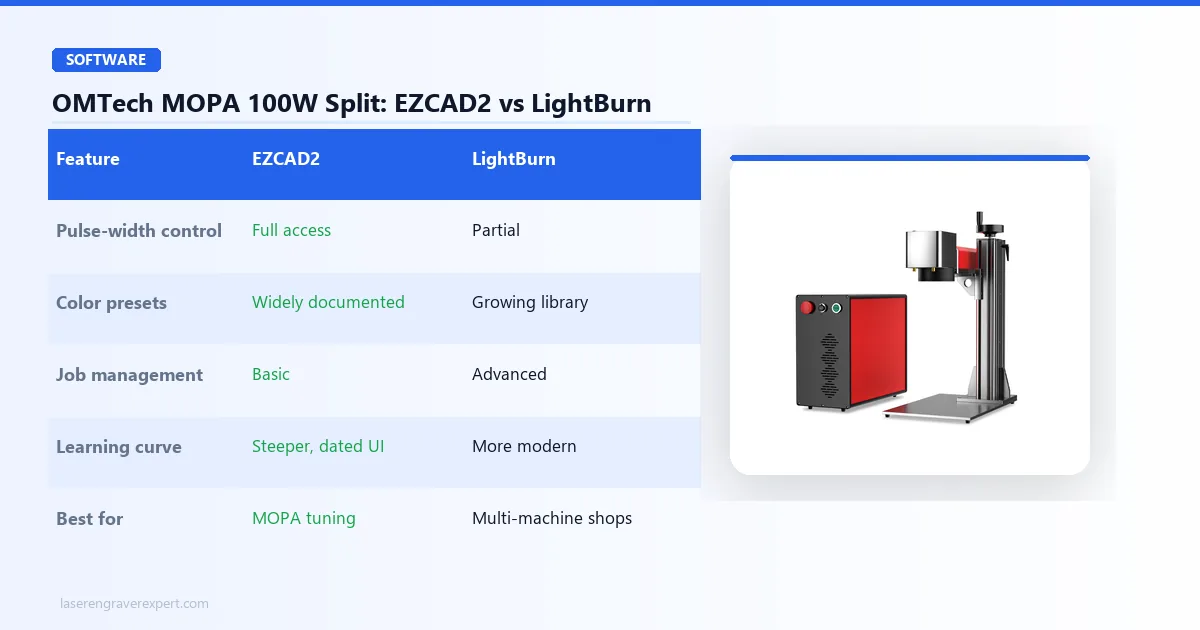
| Feature | EZCAD2 | LightBurn |
|---|---|---|
| Price | Bundled | $60 one-time |
| Pulse-width and frequency control | Full, direct access | Partial |
| MOPA color parameter sets | Most widely documented | Fewer published presets |
| Layer management, job organization | Basic, dated interface | More modern |
| Best for | Serious MOPA color work | Multi-machine shops already on LightBurn |
When to Use EZCAD2
Use EZCAD2 if you’re doing serious MOPA color work or need direct access to every pulse-width and frequency parameter this machine exposes. EZCAD2 is what the JPT MOPA source was designed around, and most published parameter sets for color oxidation on stainless steel are written for it. It’s not pretty, and the interface shows its age, but it gives you the deepest control.
When to Use LightBurn
Use LightBurn if you’re already running it on a diode or CO2 machine and want one consistent workflow across your whole shop. LightBurn’s layer management and job organization are considerably more modern than EZCAD2’s, though some of the finer MOPA-specific pulse controls are more exposed in EZCAD2.
Our honest take: learn EZCAD2 first for this machine specifically. The pulse frequency and width ranges (1–4000kHz, 2–500ns) are where the MOPA source earns its price premium over a standard fiber laser, and EZCAD2 gives you the most direct path to those settings.
OMTech MOPA 100W Split Performance: Why ±0.1μm Actually Matters
OMTech MOPA 100W Split Fiber Laser
8.7/10- 100W JPT MOPA source, highest positioning accuracy in this roundup at ±0.1μm, split-body design isolates the galvo head from the laser source unit, EZCAD2 and LightBurn compatible, 100,000-hour rated source life
- Base 110x110mm marking area is the smallest in this guide, split-body setup adds cabling and footprint, heaviest machine at 35kg net
What Nobody Tells You About Positioning Accuracy Specs
Here’s the thing most fiber laser reviews skip entirely: a positioning accuracy number on a spec sheet is meaningless without knowing what it’s isolated from. Most all-in-one fiber lasers quote a number measured under ideal, cold-start conditions.
Once the source has been running for twenty minutes and the internal fans are working to manage heat, that number degrades — sometimes considerably, because the heat and vibration sources sit right next to the optics.
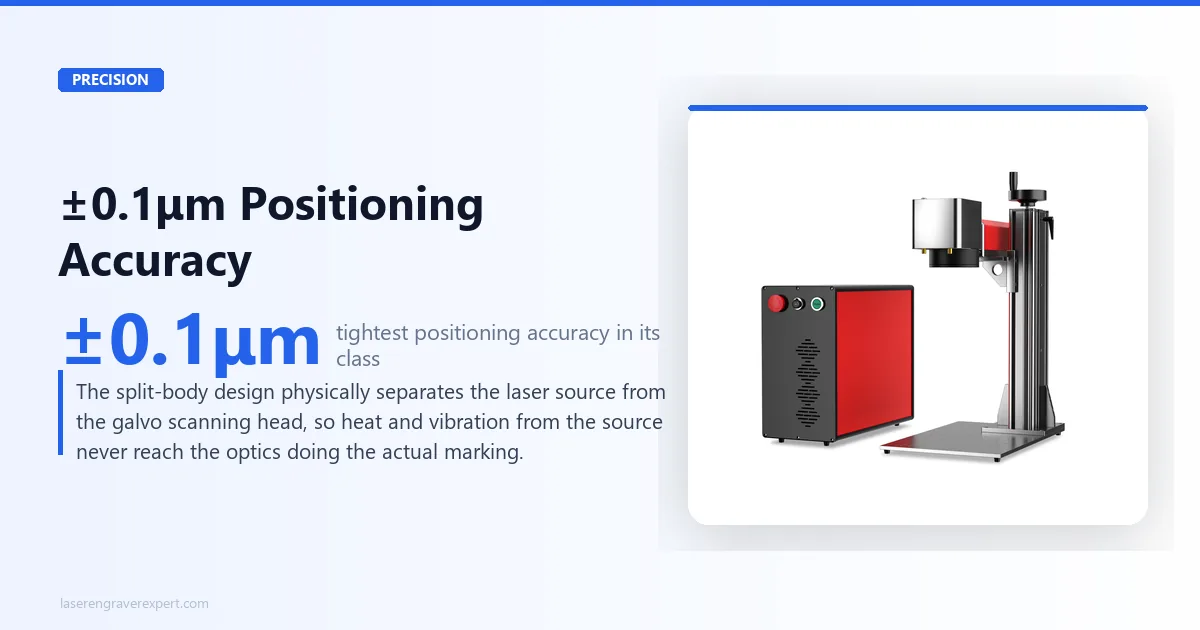
The OMTech MOPA 100W Split’s ±0.1μm figure is meaningfully different because of where that heat and vibration physically live — outside the housing that contains the galvo mirrors. That’s not a marketing claim about the number being bigger; it’s an architectural reason the number should actually hold up over a longer marking session.
If you’ve been burned by a machine that marks beautifully for the first ten pieces and then starts drifting, this is the design principle that’s supposed to prevent that.
Fine Detail and Jewelry-Scale Marking
Positioning accuracy in the sub-micron range is the difference between text that stays crisp at 4pt font on a ring band and text that blurs into an illegible smear. At ±0.1μm, this machine is built for exactly that tier of work — engraving that needs to survive a jeweler’s loupe, not just a glance across a table.
This is where the machine’s positioning claim becomes a real buyer decision point rather than a spec-sheet flex: if your product involves fine serialized text, tiny logos, or detail work under 5mm, the accuracy tier matters more than raw power or work area.
Interchangeable Lens System: 110mm vs 175mm
The base marking area is 110 × 110mm, which is genuinely the smallest field of any machine in our fiber laser lineup. That’s not an oversight — it’s the direct trade-off for the tightest detail resolution.
Smaller marking fields let the galvo scanner hold finer positioning tolerance across the whole field; larger fields inherently introduce more edge distortion and positioning drift at the corners.
The interchangeable lens option opens the field to 175 × 175mm when you need more room — for larger parts, batch layouts, or jobs where absolute pinpoint precision matters less than fitting more work in one setup.
Swapping lenses is the right call when your job mix varies: keep the 110mm lens mounted for jewelry and fine detail runs, switch to the 175mm lens for larger industrial parts or multi-piece jigs.
Color and Black Marking on Stainless Steel
Like the other JPT MOPA machines we’ve covered, the 1–4000kHz frequency range and 2–500ns pulse width give you full access to oxidation-based color marking on stainless steel.
Blue, gold, purple, and black tones are achieved through controlled surface oxidation rather than ablation, with no coatings or chemicals involved.
The precision advantage compounds here too: color marking is sensitive to consistent dwell time and beam placement, since the oxidation effect depends on even, repeatable energy delivery across the marked area.
A machine that holds tighter positioning tolerance produces more even color transitions, particularly on small or detailed color work like jewelry accents or decorative logos.
Deep Metal Engraving
The 0.15mm max marking depth is deeper than the OMTech MOPA 60W’s 0.1mm rating, giving this machine real capability beyond surface marking for parts that need engraving depth to survive handling and light abrasion.
It’s not in the same league as the M7 100W JPT MOPA’s 2.0mm depth rating, but for the precision-marking use cases this machine is built around — jewelry, small parts, tool marking — 0.15mm is more than sufficient.
OMTech MOPA 100W Split: Pros and Cons
Pros
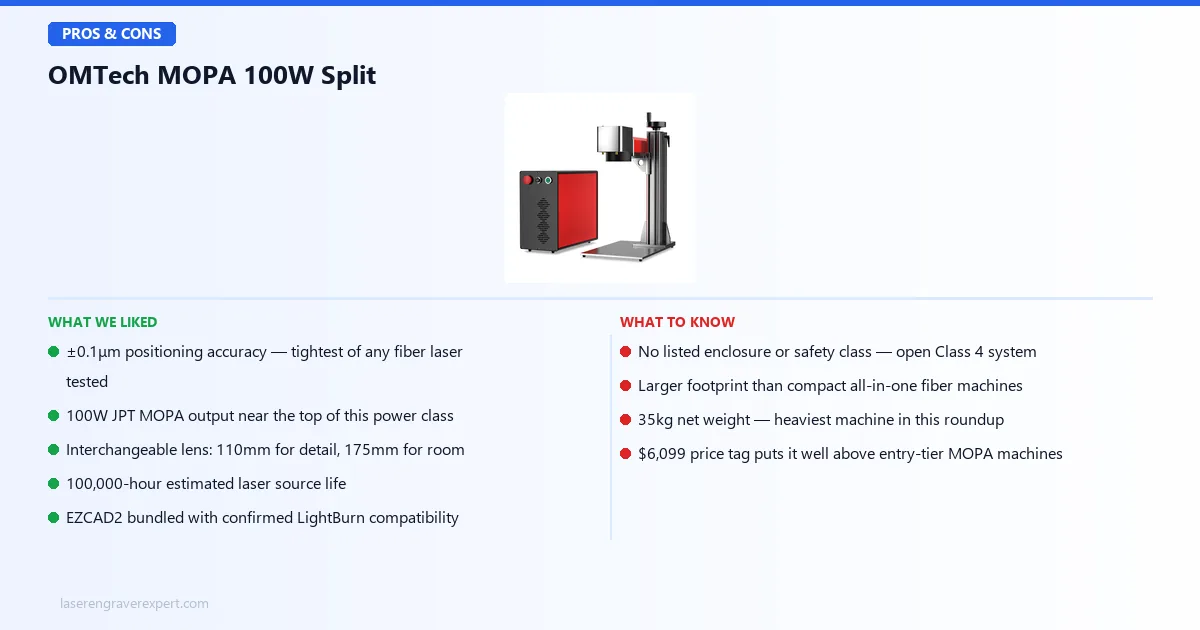
- ±0.1μm positioning accuracy is the tightest spec of any fiber laser in this lineup — a real, architecture-driven advantage from the split-body design, not just a bigger number on paper.
- 100W JPT MOPA output puts it near the top of the power range in this class, second only to the M7 100W in our fiber laser guide.
- Interchangeable lens system lets you trade marking area for detail resolution depending on the job — 110mm for fine work, 175mm when you need the room.
- 100,000-hour estimated laser source life matches the best-rated machines in this category — this isn’t hardware you’ll be replacing on any normal timeline.
- EZCAD2 bundled with confirmed LightBurn compatibility gives you a choice of workflow rather than locking you into one ecosystem.
Cons
- No listed enclosure or safety class. Treat this as an open Class 4 system — you’ll need 1064nm-rated safety glasses and should plan for a physical enclosure or safety curtain, which is an added cost OMTech doesn’t include.
- Larger footprint than compact fiber machines. The split-body architecture means two separate housings and a cable run between them — budget more bench space than an all-in-one unit like the OMTech MOPA 60W or xTool F1 Ultra needs.
- 35kg net weight makes this the heaviest machine in our fiber laser roundup. Not something you’re moving between workstations casually.
- The OMTech MOPA 100W Split price ($6,099) puts it in a different tier entirely from entry and mid-range MOPA machines. This is a considered purchase, not an impulse upgrade.
- 110mm base marking area is small if your work regularly needs more room — you’ll want to budget for the 175mm lens option, which adds to the total cost.
OMTech MOPA 100W Split vs OMTech MOPA 60W
Same brand, genuinely different machines. The OMTech MOPA 60W is the value play in OMTech’s fiber lineup — a standard all-in-one architecture that trades precision for a bigger workbed and a lower price.
| Feature | OMTech MOPA 100W Split | OMTech MOPA 60W |
|---|---|---|
| Laser Power | 100W JPT MOPA | 60W JPT MOPA |
| Architecture | Split-body (source separate from galvo head) | All-in-one |
| Marking Area | 110 × 110mm (175 × 175mm optional) | 150 × 150mm (300 × 340mm workbed) |
| Positioning Accuracy | ±0.1μm | ±1mm |
| Max Marking Depth | 0.15mm | 0.1mm |
| Estimated Source Life | 100,000 hours | 100,000 hours |
| Weight | 35kg | 28kg |
| Software | EZCAD2, LightBurn | EZCad2 |
| Price | $6,099 | $4,099 |
The difference isn’t “more power, more money” — it’s architecture. The MOPA 60W gives you a larger working bed and a genuinely usable machine for straightforward marking jobs at a price closer to the entry tier.
The MOPA 100W Split gives up bed size and simplicity in exchange for positioning accuracy that’s roughly four orders of magnitude tighter.
If your work is general metal marking — logos, serials, barcodes — at reasonable detail, the MOPA 60W is the more sensible buy and saves you $2,000. If your work requires jewelry-grade fine text or repeatable sub-micron placement, the accuracy gap is the whole reason to spend the extra money.
OMTech MOPA 100W Split vs M7 100W JPT MOPA
This part of the OMTech MOPA 100W Split review is the most direct power-matched comparison in our lineup, since both machines run 100W JPT MOPA sources. The differentiation is entirely in what each machine optimizes for. Full details on the M7 are in our best fiber laser engraver guide .
| Feature | OMTech MOPA 100W Split | M7 100W JPT MOPA |
|---|---|---|
| Laser Power | 100W JPT MOPA | 100W JPT MOPA |
| Marking Area | 110 × 110mm (175 × 175mm optional) | 175 × 175mm (lens-dependent) |
| Max Marking Depth | 0.15mm | Up to 2.0mm |
| Positioning Accuracy | ±0.1μm | Not published at this tier |
| Warranty | Manufacturer warranty (varies by region) | 3 years (source and machine) |
| Architecture | Split-body | Enclosed industrial form factor |
| Software | EZCAD2, LightBurn | EZCad 2 and 3, LightBurn via adapter |
| Price | $6,099 | $6,999 |
Where the OMTech MOPA 100W Split wins: positioning precision is the headline, and it’s not close — the split-body design is purpose-built for accuracy in a way the M7’s form factor doesn’t target. It’s also $900 cheaper.
Where the M7 wins: engraving depth (up to 2.0mm versus 0.15mm) and warranty coverage (3 years versus a manufacturer warranty that varies by region).
If your work is mold marking, asset tags, or anything that needs to survive heavy abrasion over years of use, the M7’s depth capability and longer warranty matter more than sub-micron placement ever will.
Our take: these aren’t really competing for the same buyer. Choose the OMTech MOPA 100W Split when precision on small, detailed parts is the job. Choose the M7 when engraving depth and long-term warranty coverage on industrial parts is the job.
Who Should Buy the OMTech MOPA 100W Split?
- Precision jewelry engravers. If your product is rings, pendants, or small metal jewelry pieces that need crisp fine text or detail work under a loupe, the ±0.1μm accuracy is exactly the spec that separates readable engraving from a blur.
- Small-parts industrial marking shops. Serial numbers, QR codes, and part IDs on small components where placement consistency across a production run matters more than raw work area.
- Buyers who’ve been burned by drift on all-in-one fiber lasers. If you’ve run a standard fiber laser that marks beautifully cold and drifts after twenty minutes of continuous operation, the split-body’s thermal isolation directly addresses that failure mode.
- Anyone weighing accuracy over speed or work area. This isn’t the machine for batch-marking large sheet metal or running the fastest possible dog-tag production line — for that, look at the ComMarker B4 or M7 100W instead.
If your priority is a bigger workbed at a lower price and the OMTech MOPA 100W Split price ($6,099 vs $4,099) is a stretch, the OMTech MOPA 60W is the more sensible buy. For an even lower entry point into true MOPA fiber marking, our Monport GM60 MOPA Pro review covers the budget end of this category. If you need real depth for industrial durability, the M7 100W is worth the extra $900.
OMTech MOPA 100W Split Buying Guide: What Split-Body Architecture Actually Means
Understanding Split-Body vs All-in-One
Most desktop fiber lasers pack the MOPA source and the galvo scanning head into one enclosure — it’s simpler to manufacture, cheaper to ship, and easier to set up.
The trade-off is that the source’s heat and vibration sit inches from the optics doing the marking, which is the practical ceiling on how tight an all-in-one machine’s positioning accuracy can get.
Split-body designs move the source unit out of the housing entirely, connecting it to the galvo head through cabling. This is standard practice on true industrial marking systems for exactly this reason — isolate the parts that generate heat and vibration from the parts that need to stay mechanically stable.
The cost is more setup complexity and a larger overall footprint, which is the real trade-off you’re accepting for the accuracy gain.
Why Positioning Accuracy Matters More Than You Think
Most buyers shopping fiber lasers focus on power — more watts sounds like more capability. Here’s the problem: at 60W and above, nearly every machine in this class can mark standard steel, aluminum, and brass without issue. Power stops being the differentiator once you’re past the entry tier.
What actually separates machines at this level is whether the mark lands exactly where you told it to, every single time, across an entire production run.
A 100W source with loose positioning tolerance will still produce readable marks on larger parts — but it will visibly struggle on fine text, small logos, or jewelry-scale detail where a fraction of a millimeter of drift is the difference between crisp and smeared.
Red Flags to Avoid
- No listed positioning accuracy spec at all — if a manufacturer doesn’t quote this number, assume it’s not competitive
- Vague “high precision” marketing language with no actual μm or mm figure attached
- No mention of safety class or enclosure status on a Class 4-capable machine — check before assuming it’s safe for a shared workspace
- Bundled software that isn’t named specifically (avoid listings that just say “included software” without confirming EZCAD2 or LightBurn compatibility)
- No stated laser source lifespan — 100,000 hours is the benchmark for MOPA sources in this class; anything unlisted is worth questioning
OMTech MOPA 100W Split Final Verdict — Here’s How to Choose
This OMTech MOPA 100W Split review has covered the specs and the trade-offs. Here’s the simple version:
- If precision on small, detailed metal parts is your job → the OMTech MOPA 100W Split is the right pick, and the ±0.1μm accuracy is worth the $6,099.
- If you want a bigger workbed and standard-grade accuracy at a lower price → go with the OMTech MOPA 60W instead.
- If you need real engraving depth for industrial durability → the M7 100W JPT MOPA’s up-to-2.0mm depth and 3-year warranty are worth the extra $900.
- If you’re still not sure → the OMTech MOPA 100W Split is the safe bet for anyone whose work genuinely depends on fine-detail placement, because no other machine in this class matches its accuracy.
That’s the full picture from our OMTech MOPA 100W Split review. For the full field of fiber lasers we’ve covered and ranked, see our best fiber laser engraver guide .
Ready to buy?
Check OMTech MOPA 100W Split Price on Amazon →OMTech MOPA 100W Split: Frequently Asked Questions
What is the positioning accuracy of the OMTech MOPA 100W Split?
The OMTech MOPA 100W Split is rated for ±0.1μm (±0.0001mm) positioning accuracy — the tightest spec of any fiber laser we cover on this site, including the industrial-grade M7 100W and the OMTech MOPA 60W.
That figure comes from the split-body architecture, which physically separates the laser source unit from the galvo scanning head so heat and vibration from the source don’t reach the optics doing the marking.
What's the difference between the OMTech MOPA 100W Split and the OMTech MOPA 60W?
The core difference is architecture, not just power. The MOPA 60W is a standard all-in-one fiber laser rated at ±1mm positioning accuracy. The MOPA 100W Split uses a split-body design that physically isolates the source unit from the scanning head, getting it down to ±0.1μm.
You’re also getting more power (100W vs 60W) and a smaller base marking area (110mm vs 150mm) with an optional 175mm lens.
Does the OMTech MOPA 100W Split work with LightBurn?
How deep can the OMTech MOPA 100W Split engrave metal?
Is the OMTech MOPA 100W Split safe to use without an enclosure?
OMTech does not list a safety class for this machine, and there’s no built-in enclosure. Treat it as a Class 4 open-galvo system — you’ll need 1064nm-rated safety glasses and ideally a physical enclosure or safety curtain around the marking area.
That precaution matters even more here, since the split-body design means the beam path runs external cabling between two separate housings.
What materials can the OMTech MOPA 100W Split engrave?
Not sure this is the right fiber laser for your work? Browse our full best fiber laser engraver guide for the complete ranked comparison across power tiers, budgets, and use cases.