See Current Sculpfun E1 Price →
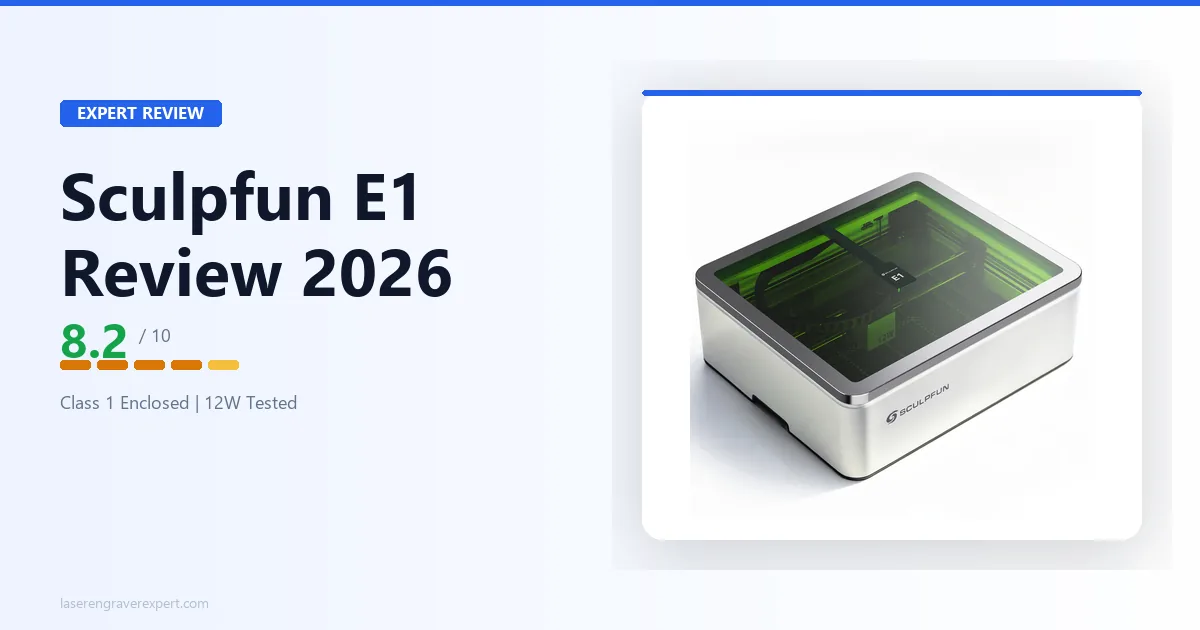
The Sculpfun E1 is a fully enclosed, Class 1 diode laser with CoreXY motion, a built-in HD camera, and LightBurn support, all under $400. That combination barely existed at twice the price two years ago.
Most competitors in this price bracket are bare open-frame Cartesian machines with no enclosure and no camera. The E1 is a different machine entirely. This Sculpfun E1 review covers what that means in practice, and exactly where the 12W diode hits its ceiling.
Sculpfun E1 Specifications
The Sculpfun E1 is a 12W enclosed diode laser engraver with a CoreXY motion system, 400 × 320mm work area, and a Class 1 safety rating, one of the very few diode lasers at this price that does not require safety goggles or a dedicated room.
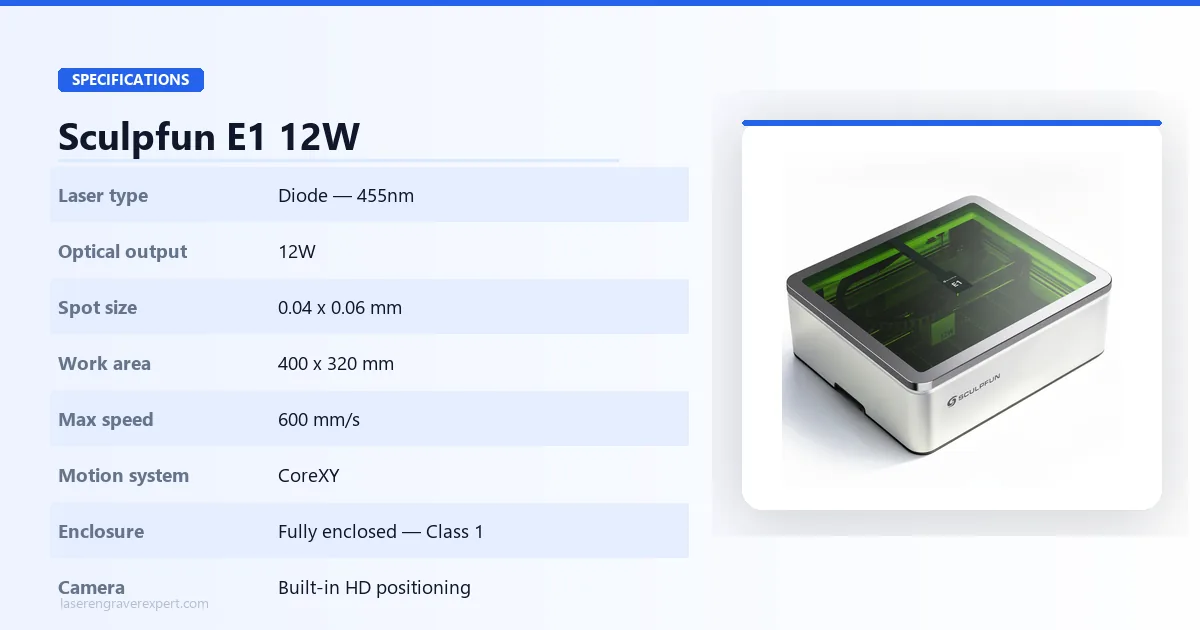
| Specification | Detail |
|---|---|
| Laser Type | Diode, 455nm |
| Optical Power | 12W |
| Spot Size | 0.04 × 0.06mm |
| Work Area | 400 × 320mm |
| Max Engraving Speed | 600mm/s |
| Motion System | CoreXY |
| Enclosure | Fully enclosed, Class 1 |
| Camera | Built-in HD positioning camera |
| Connectivity | USB, Wi-Fi |
| Compatible Software | Sculpfun Space, LightBurn, LaserGRBL |
| Supported File Types | JPEG, PNG, JPG, BMP, SVG, DXF |
| Operating System | Windows, macOS, Android, iOS |
| Safety Features | Lid-open auto pause, emergency stop, protective viewing cover |
| Air System | Built-in exhaust airflow |
| Input Voltage | 24V 4A |
| Machine Dimensions | 590 × 500 × 205mm |
| Machine Weight | 11.95kg |
| Certifications | CE, FCC, RoHS, IEC60825 |
| Engravable Materials | Wood, MDF, Bamboo, Leather, Dark/Opaque Acrylic, Stone, Ceramic, Glass, Coated Metal |
| Cuttable Materials | Wood, MDF, Plywood, Leather, Dark Acrylic |
| Price (Estimated) | ~$299–$399 |
Sculpfun E1 Design, Safety, and Build Quality
The E1’s Class 1 enclosure and CoreXY motion system are what separate it from every open-frame diode laser in this price range. Here is what that means in practice.
Class 1 Safety: The Spec That Determines Where This Machine Can Live
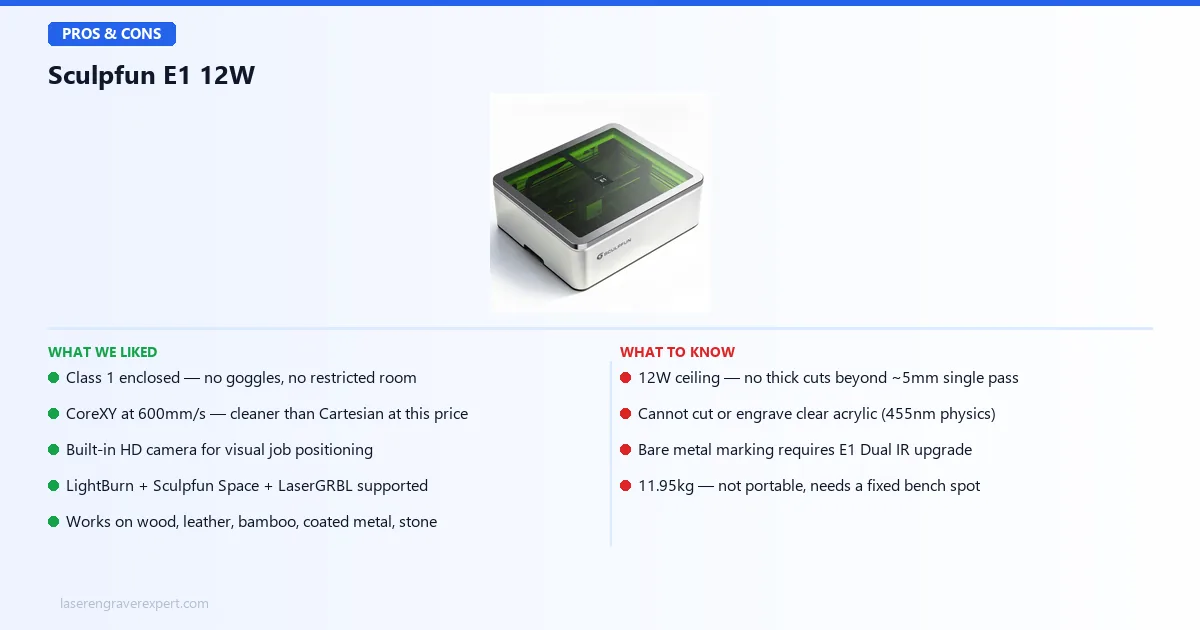
Class 1 means the machine contains the laser safely under normal operation. No safety goggles required. No dedicated room. No restricted-access signage.
This is what opens up real locations for the E1: a desk in a shared office, a classroom, a home studio, a kitchen counter. Open-frame Class 4 diode machines cannot go in any of those places safely. The E1 can.
The IEC60825 certification is not a marketing badge. It is a verified classification that requires the laser to be mechanically inaccessible during operation. The lid-open auto-pause enforces this: the laser physically cannot fire with the enclosure open. The emergency stop and protective viewing cover round out a safety stack that takes the machine into genuinely family-safe territory.
CoreXY Motion: the Feature Budget Reviews Ignore
Most diode lasers under $400 use a Cartesian gantry. The Y-axis moves the bed; the X-axis moves the laser head. Simple, cheap to build, and limited. At high speeds, Cartesian systems produce ringing and ghosting on fine text, curves, and diagonal fills.
CoreXY moves both stepper motors simultaneously to drive the head in any direction. At 600mm/s, that is not a minor advantage. Tighter curves, cleaner linework, and consistent fill quality across the entire work area. It shows up on every job with curves or diagonal passes, which is most engraving work.
At this price, finding CoreXY inside a fully enclosed machine is unusual. It is one of the clearest reasons the E1 competes above its bracket.
Build and Footprint
At 590 × 500 × 205mm and 11.95kg, the E1 has roughly the footprint of a large microwave. Not portable, but desk-sized. The enclosure adds bulk over open-frame competitors, but that bulk is the entire point: it contains the beam, the fumes, and the noise.
The built-in exhaust airflow system handles immediate smoke extraction during operation. It is not a replacement for a window vent or external filter on long sessions, but it is a meaningful step up from open-frame machines that exhaust directly into the room.
The built-in HD positioning camera enables visual job placement without manual measurement. You see a live overlay of the work area, position your design on the material, and send the job. It works similarly to how the xTool S1’s camera operates: drag, position, run.
Sculpfun E1 Software: Sculpfun Space, LightBurn, LaserGRBL
Three software options cover the full range from complete beginner to advanced operator.
| Software | Price | Best For | Platform |
|---|---|---|---|
| Sculpfun Space | Free | Beginners, mobile users, camera-based positioning | Windows, macOS, Android, iOS |
| LightBurn | $60 one-time | Advanced toolpathing, multi-layer jobs, production work | Windows, macOS, Linux |
| LaserGRBL | Free | Windows users who want manual GRBL control | Windows only |
Best for beginners: Sculpfun Space. Mobile support on Android and iOS is a practical advantage. Camera positioning works natively through Sculpfun Space. No complicated setup: connect and start.
Best for advanced users: LightBurn. Complex vector work, layer ordering, kerf offset, cut sequencing. The E1 is fully LightBurn compatible. If you already own a LightBurn license from a previous machine, it transfers with no extra cost.
Best free option: LaserGRBL. More manual control than Sculpfun Space, completely free, works well for Windows users already familiar with GRBL-based workflow.
Sculpfun E1 Performance
Engraving Performance
The 0.04 × 0.06mm spot size is one of the tightest on any diode laser in this price range. Fine text, intricate linework, and photographic grayscale engravings all benefit from that focal precision.
At 600mm/s with CoreXY motion, large fill engravings complete noticeably faster than on comparable Cartesian machines, which typically top out at 300–400mm/s with usable quality. On a 300mm × 200mm text engrave, that speed difference compounds into minutes saved per job.
Grayscale photo engraving on basswood produces clean tonal separation. The tight spot size and stable motion system combine to keep banding minimal at high speeds, a common weak point on cheaper Cartesian machines at this speed range.
Cutting Performance
At 12W, the E1 is a capable cutter for hobby-scale material thicknesses. Clean results on plywood up to 3mm in one to two passes. MDF at 5mm is achievable in two to three passes. Beyond 6mm of hardwood, expect multiple passes and edge char; the 12W ceiling becomes real here. For frequent thick-material cutting, the E1 Pro at 21W is the correct machine.
Leather cuts cleanly at low speeds. Thin leather in a single pass, heavier vegetable-tanned stock in two. The enclosed airflow system helps keep the cut zone clear on leather, which smokes significantly.
Supported Materials
| Material | Expected Capability | Notes |
|---|---|---|
| 3mm Plywood | Cut in 1–2 passes | Handles cleanly, standard hobby benchmark |
| 5mm MDF | Cut in 2–3 passes | Dense MDF benefits from multiple passes |
| 6mm+ Hardwood | Difficult | Edge char, multiple passes, E1 Pro recommended |
| Leather | Engrave and cut | Excellent; thin leather cuts in a single pass |
| Dark/Opaque Acrylic | Engrave and cut | Good results on coloured and opaque stock |
| Bamboo | Engrave and cut | Fast and clean; one of the best materials for this machine |
| Coated/Anodized Metal | Engrave | Laser paint, powder coat, and anodized aluminum all respond well |
| Stone and Ceramic | Engrave | Low-speed passes; surface marking only |
| Glass | Surface etch only | Diode cannot achieve deep engraving on glass |
| Bare Metal | Not supported | Requires IR laser, see E1 Dual |
Can the Sculpfun E1 Cut Clear Acrylic?
No. This is the most common buyer mistake with any 455nm diode laser.
The blue diode wavelength passes straight through transparent material without absorption. Clear acrylic will not engrave or cut regardless of power settings; the beam goes through it. Only dark or opaque acrylic works with a 455nm diode.
If clear acrylic is part of your work (keychains, signs, jewelry) you need a CO2 laser. See our best CO2 laser engravers guide for options. This applies to every 455nm diode on the market, not just the E1.
Sculpfun E1 vs E1 Pro: Which Should You Buy?
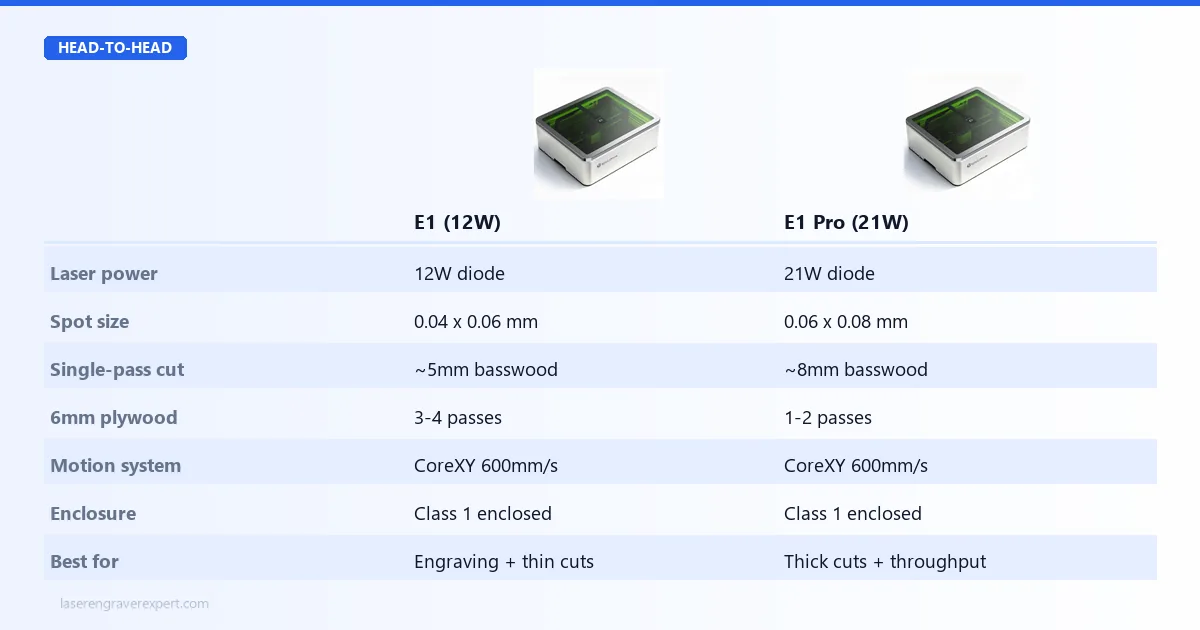
The E1 and E1 Pro share the same chassis, enclosure, and camera. The only difference is laser output, and whether that gap matters depends entirely on what you cut.
Why Would Anyone Choose the E1 Pro?
Looking at the spec table, the machines look nearly identical. So what actually justifies the E1 Pro’s higher price?
Pass count on 6mm plywood. The E1 needs 3–4 passes. The E1 Pro does it in 1–2. If you cut a batch of 20 coaster blanks, that’s the difference between a 40-minute job and a 15-minute job. At any kind of production pace, that compounds daily.
Single-pass basswood ceiling. The E1 tops out at ~5mm single pass. The E1 Pro pushes to ~8mm. That gap opens up product categories: thicker box sides, deeper relief cuts, denser hardwood species that 12W just chars rather than cuts.
Spot size trade-off. Here’s what nobody mentions: the base E1 actually has a tighter spot at 0.04 × 0.06mm vs the Pro’s 0.06 × 0.08mm. For ultra-fine engraving (small text, intricate detail work on jewelry or keychains), the base E1 has a measurable edge on resolution. The Pro trades spot precision for raw cutting power.
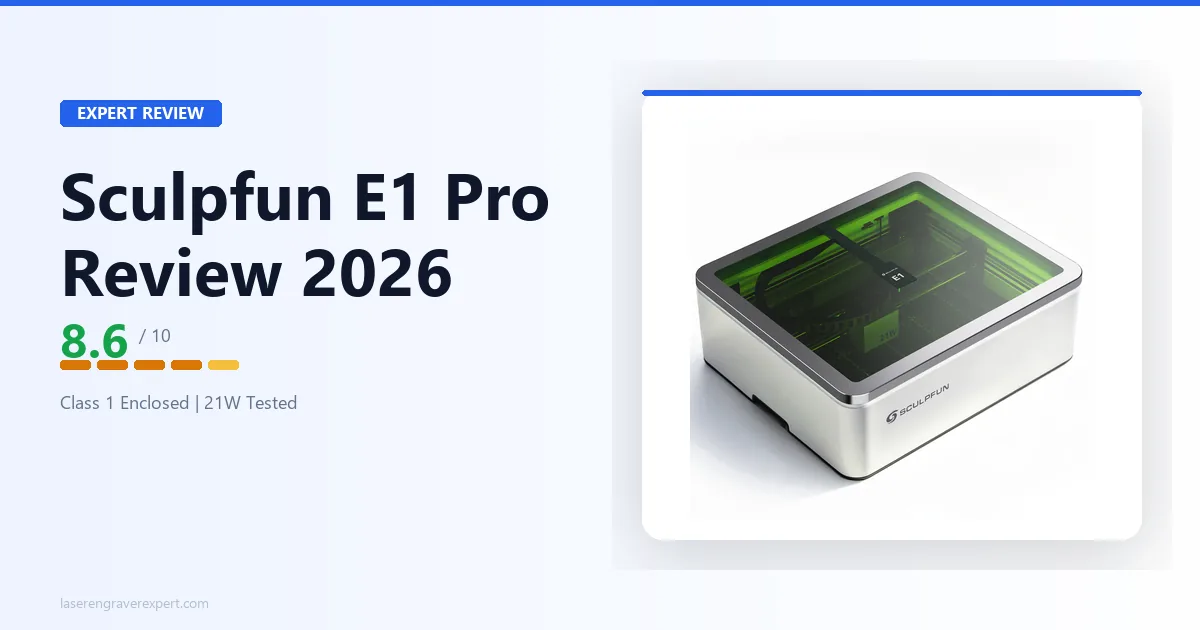
The honest answer: if your work is primarily engraving and occasional thin cuts, the E1 is the better buy. The E1 Pro is for anyone cutting 6mm+ stock regularly or needing faster throughput on thick material. The machines are not competing on features; they are competing on what your material list looks like. For the full breakdown of the higher-output model, see our Sculpfun E1 Pro review .
The E1 family has four variants. Here is exactly what changes between them.
| Model | Diode Power | IR Laser | Spot Size | Single-Pass Cut | Best For |
|---|---|---|---|---|---|
| E1 | 12W | No | 0.04 × 0.06mm | ~5mm basswood | Engraving, thin cuts, fine detail |
| E1 Dual | 12W | 3W IR | 0.04 × 0.06mm | ~5mm basswood | E1 uses + bare metal marking |
| E1 Pro | 21W | No | 0.06 × 0.08mm | ~8mm basswood | Thick cuts, faster throughput |
| E1 Pro Dual | 21W | 3W IR | 0.06 × 0.08mm | ~8mm basswood | Maximum capability, no compromises |
Buy the E1 if:
- ✓ Mostly engraving: wood, leather, bamboo, coated metal
- ✓ Cutting stays under ~5mm most of the time
- ✓ Fine detail work matters: the tighter 0.04mm spot wins here
- ✓ Budget is the deciding factor
Buy the E1 Dual if:
- ✓ You need bare metal marking (stainless steel, raw aluminum, brass, copper) without any coating compound
- ✓ 12W is enough for your cutting needs, but IR opens up your product range
- ✓ Jewelry, custom gifts, or any metal personalization is part of your workflow
Buy the E1 Pro if:
- ✓ You regularly cut 6mm+ plywood, MDF, or dense hardwood
- ✓ Job time matters: the 21W advantage compounds across every thick-material job
- ✓ You are scaling from occasional hobby use to small-batch production
Buy the E1 Pro Dual if:
- ✓ You want zero material limitations: thick cuts AND bare metal marking
- ✓ Your product range spans wood, leather, and metal items
- ✓ You do not want to buy two machines to cover different material categories
Sculpfun E1 Dual: What the IR Laser Actually Enables
The E1 Dual adds a 3W infrared laser at 1064nm alongside the 12W diode. Here is exactly what that changes.
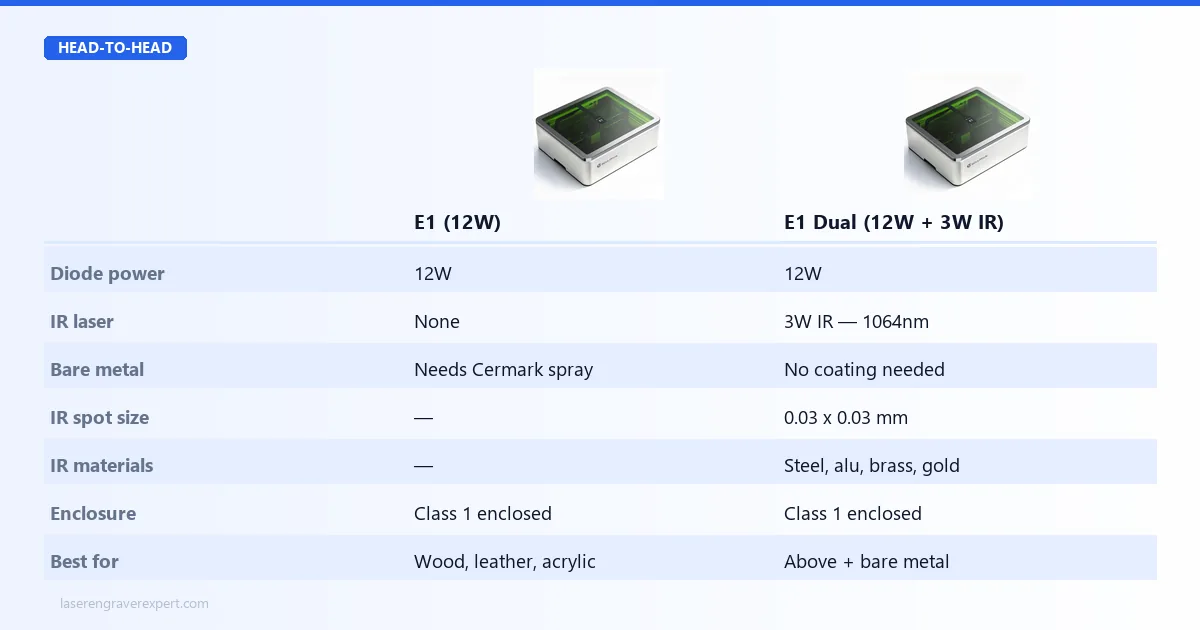 That single addition changes the machine’s material range fundamentally.
A 455nm diode cannot mark bare metal. Period. Steel, raw aluminum, brass, copper, silver: the blue wavelength reflects off them without absorption. You can spray Cermark or similar marking compounds and engrave over the coating, but that adds $30–$50 per bottle, prep time, and cleanup to every single metal job.
The 3W IR laser at 1064nm is absorbed directly by metal surfaces. No compound. No prep. You place the item, run the job, done.
What the IR module marks:
- ✓ Stainless steel: tumblers, dog tags, cutlery, tools
- ✓ Raw aluminum: machined parts, nameplates, business card holders
- ✓ Brass and copper: jewelry findings, decorative hardware
- ✓ Silver and gold: jewelry engraving
- ✓ Titanium: surgical tools, premium accessories
- ✓ Certain plastics and acrylic types the diode cannot mark cleanly
The IR spot size is 0.03 × 0.03mm, tighter than the diode’s 0.04 × 0.06mm. Fine detail on metal (serial numbers, small logos, intricate patterns) benefits from that precision.
Who needs the E1 Dual:
- ✓ Anyone doing custom gifts that include metal items
- ✓ Jewelers marking silver, gold, or titanium pieces
- ✓ Small businesses offering stainless tumbler personalization
- ✓ Anyone who wants to avoid Cermark costs on every metal job
Who does not need it:
- ✗ Pure woodworkers and leather crafters: the 12W diode covers everything you need
- ✗ Anyone whose material list never includes bare metal
The E1 Dual costs more than the base E1 but less than the E1 Pro. If bare metal is in your workflow but thick cutting is not, it is the cleaner upgrade than the Pro.
Who Should Buy the Sculpfun E1?
✓ Beginners: Sculpfun Space is genuinely easy to learn. The camera positioning removes the need to measure manually. Class 1 safety means the machine is forgiving of mistakes.
✓ Parents: Kids can be in the room during operation. The lid-open auto-pause prevents the most dangerous scenario. No goggles, no restricted zone.
✓ Teachers and makerspace coordinators: Class 1 certification removes the liability problem that open-frame Class 4 machines create in shared environments. No dedicated signage or restricted access required.
✓ Apartment and small-space users: Desk footprint, enclosed fumes, built-in exhaust. The E1 does not need a workshop.
✓ Hobbyists upgrading from open-frame machines: If you have been running a Sculpfun S30, xTool D1 Pro, or similar open-frame diode and want enclosure without paying CO2 prices, the E1 is the natural next step. LightBurn compatibility means your existing files and workflows carry straight over.
Who Should Skip the Sculpfun E1?
✗ Clear acrylic users: The 455nm diode cannot process transparent material. A CO2 machine is required. See our best CO2 laser engravers .
✗ Bare metal engravers: Stainless, raw aluminum, brass, copper, none of these respond to 455nm without a coating. The E1 Dual’s 3W IR module is what you need.
✗ Heavy wood cutters: If 6mm+ plywood or thick hardwood is regular work, 12W will frustrate. The E1 Pro at 21W is the right answer.
✗ Production businesses: The E1 is built for hobby and small-batch use. Running 6+ hours daily at production volume calls for higher-duty-cycle hardware.
Sculpfun E1 vs xTool S1: How Do They Compare?
The xTool S1 is the most direct competitor: also enclosed, also CoreXY, also Class 1. Here is the key difference:
The S1 20W runs at 20W diode power versus the E1’s 12W, a meaningful gap for cutting. The S1 also carries a larger work area (498 × 330mm vs 400 × 320mm) and a more established software ecosystem in xTool Creative Space. It is also significantly more expensive.
If budget is the deciding factor and your work stays within the E1’s material range, the E1 makes sense. If you want more cutting power and a larger bed and can stretch the budget, the xTool S1 review covers why that extra spend is justified for heavier use cases.
Sculpfun E1 Review: Final Verdict
The Sculpfun E1 earns an 8.2 out of 10.
Class 1 enclosure, CoreXY motion, a built-in HD camera, and LightBurn compatibility at under $400 is a combination that did not exist in this price bracket until now. It is not a marginal upgrade over open-frame budget diodes; it is a different category of machine.
The honest limits are clear: 12W means no thick cuts, no bare metal, no clear acrylic. If any of those are regular requirements, step up to the E1 Dual, E1 Pro, or a CO2 machine.
For everyone else (beginners, parents, teachers, hobbyists, apartment makers) the Sculpfun E1 is one of the most complete beginner laser engravers you can buy right now.
Ready to buy?
Check Current Price on Amazon →